

What Is a Dash Cam and How Does It Work?
A dashcam is a small camera designed to record what happens around your vehicle while you drive. Most models mount near the windshield or dashboard and automatically record video when the vehicle is powered on.
Unlike a regular camera, a dash cam is designed for continuous recording. It typically saves footage in short video clips, uses loop recording to manage storage, and can protect important footage when it detects a sudden impact.
Modern dash cams can do much more than simply point a lens at the road. Depending on the model, a dashboard camera may include GPS, Wi-Fi, front and rear recording, parking monitoring, night recording, a built-in display, and other features designed to make recorded footage easier to review.
But how does all of this actually work?
Let's break down what happens from the moment you start your car to the moment you need to find a particular recording.
What Is a Dash Cam?
A dash cam, also called a dashcam, dashboard camera, or car camera, is a compact video recording device installed inside a vehicle.
The most common setup places the camera near the top of the windshield, usually around the rearview mirror. From there, the lens can capture a forward-facing view of the road.
Some systems use two or more cameras. A front and rear dash cam records both the road ahead and the area behind the vehicle. Three-channel systems can add a cabin-facing camera as well.
The basic purpose is simple: continuously record your journey so that useful footage is available if something happens on the road.
For example, imagine another vehicle changes lanes and makes contact with your car. Instead of relying entirely on memory or another driver's description of what happened, you may have a timestamped video showing the event.
A dash cam does not prevent an accident, and it should never replace attentive driving. Its value comes from documenting what the camera can actually see.
How Does a Dash Cam Work?
The basic operation of a dash cam is surprisingly straightforward.
When the vehicle starts and provides power to the camera, the dash cam boots up and begins recording. The lens captures the scene, an image sensor converts the incoming light into digital information, and the camera's processor turns that information into video files.
Those files are normally stored on a memory card.
Most dash cams are designed to keep recording rather than stop when the memory card becomes full. That's where loop recording comes in.
Here's a simplified view of the process:
| What Happens | What the Dash Cam Does |
|---|---|
| You start the vehicle | The camera receives power and starts recording. |
| You drive | The lens and image sensor capture video. |
| Video is recorded | Footage is saved as short clips. |
| Storage fills up | The oldest unprotected footage is overwritten. |
| A sudden impact occurs | The G-sensor can trigger protection for the relevant clip. |
| You need the footage | You can review, download, or transfer the recording. |
The exact behavior varies between models, but this recording cycle is the foundation of most dash cameras.
What Is Loop Recording?
Loop recording is one of the most important features in a dash cam.
A memory card has a finite amount of storage. If a camera recorded continuously and simply stopped when the card became full, you would eventually have to manually delete old files before the camera could record again.
Loop recording solves that problem.
Instead, the dash cam divides the recording into smaller files, such as one, three, or five-minute clips. Once the available storage is nearly full, the camera can overwrite older unprotected clips with new footage.
This allows the camera to keep recording during normal driving without requiring you to constantly manage the memory card.
There is one important distinction: protected or locked files are generally treated differently from ordinary loop footage. If a clip has been flagged as important, the camera should prevent it from being automatically overwritten.
That's why it is a good habit to download important footage as soon as possible rather than assuming a locked clip will remain on the card forever.
What Is a G-Sensor in a Dash Cam?
A G-sensor is an accelerometer that detects changes in movement and force.
In a dash cam, it can be used to recognize events such as sudden braking, a collision, or another significant impact. When the detected force reaches the camera's configured threshold, the dash cam can mark or lock the video associated with the event.
Some cameras also allow the driver to manually lock a recording.
This matters because normal loop recording is designed to overwrite older footage. If an important clip is protected, it can be kept out of the normal overwrite cycle.
The sensitivity setting matters, too. If it is set excessively high, ordinary events such as potholes or speed bumps may cause unnecessary files to be locked. If it is too low, a relatively minor impact may not trigger it.
For that reason, G-sensor behavior should be considered a useful automatic protection feature, not a guarantee that every incident will be detected.
Modern dash cams can also use buffered recording, which can preserve footage immediately before an incident as well as the moments afterward. Garmin, for example, documents incident detection that can save footage from before, during, and after an event on supported models.
Does a Dash Cam Record When the Car Is Off?
Not necessarily.
This is one of the most common misunderstandings about dashcams.
A dash cam needs power to record. In a typical installation, the camera receives power when the vehicle is running. When the vehicle is turned off, the power source may also shut down, causing the camera to stop recording.
That's where parking mode comes in.
A dash cam equipped for parking monitoring can continue watching the vehicle after the engine is switched off, provided it has an appropriate source of power and the feature is supported by the camera.
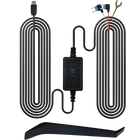
Many parking-mode systems use an always-on power connection, a hardwire kit, an OBD power solution, or a dedicated dash cam battery pack. Garmin's documentation, for example, specifies a constant power source for its parking features.
How Does Dash Cam Parking Mode Work?
Parking mode is designed to monitor the vehicle while it is parked.
Depending on the dash cam, parking recording may be triggered by:
- A detected impact
- Movement in front of the camera
- A combination of motion and impact detection
- Time-lapse recording
- Buffered parking recording
The exact implementation varies by manufacturer.
A practical example would be a vehicle parked outside a store. Another car backs into the bumper and leaves. If the dash cam has suitable parking monitoring, power, camera coverage, and a trigger that detects the event, it may save footage of what happened.
Parking mode is not automatically available simply because a camera has a battery. A proper power setup is an important part of the installation.
Privacy rules can also affect parking recording. Garmin notes that some parking features may not be available in all areas because of privacy regulations. Drivers should understand the laws applicable to where they use the camera.
What Does a Dash Cam Record?
A standard front-facing dash cam primarily records the road in front of the vehicle.
Depending on the model and its field of view, the recording may include:
- Traffic directly ahead
- Adjacent lanes
- Road signs
- Traffic lights
- Vehicles approaching from the front
- Pedestrians or cyclists within the camera's view
- Road conditions
- Other visible events around the vehicle
A wider field of view can capture more of the scene, but wider is not automatically better. Extremely wide lenses can introduce distortion toward the edges of the image.
For drivers who want more coverage, a front and rear dash cam uses a second camera to record behind the vehicle as well. This can be useful because a front-facing camera cannot document an event that occurs exclusively behind the car.
For a closer look at how dual-channel recording works, see TORVO's guide to front and rear dash cams.
Why Does Dash Cam Resolution Matter?
Resolution determines how much image detail the camera can capture.
You may see specifications such as:
- 1080p Full HD
- 1440p
- 2K
- 4K
A higher resolution can provide more image detail, which can be useful when reviewing road signs, vehicles, or other objects in the footage.
However, resolution is only one part of image quality.
A 4K dashcam can still produce disappointing footage if it has poor low-light performance, excessive motion blur, an inferior lens, bad exposure, or poor installation.
Nighttime conditions are particularly important. Headlights, streetlights, reflections, rain, and rapidly changing brightness can all affect what a camera captures.
If you're comparing 4K models, our guide to whether a 4K dash cam is worth it covers the trade-offs in more detail.
What Is a Dash Cam With GPS?
Some dash cameras include built-in GPS.
GPS can associate information such as location and speed with the recording, depending on the camera and its software.
This can make footage more informative because the video may contain additional location or timing information rather than being only a visual recording.
But GPS in a dash cam should not be confused with live vehicle tracking.
A camera can have GPS for recording location data without offering remote tracking of the vehicle. Remote tracking generally requires additional connectivity and supporting services.
For more detail, see do you need a dash cam with GPS tracking?
What Does Wi-Fi Do on a Dash Cam?
Wi-Fi is another feature that can make a dash camera easier to use.
A Wi-Fi-enabled dash cam can establish a wireless connection with a compatible smartphone. Depending on the camera and app, you may be able to:
- Browse recorded videos
- Download clips
- View a live camera feed
- Change settings
- Manage recordings
- Share footage from your phone
This does not necessarily mean the dash cam has internet access.
In many cases, the Wi-Fi connection is simply a local connection between the camera and your phone. The camera can continue recording to its memory card without being connected to your home Wi-Fi network.
For a deeper explanation, read how Wi-Fi dash cams work.
What Kind of Memory Card Does a Dash Cam Need?
Because a dash cam continuously writes video, the memory card is an important part of the system.
Do not choose a card based only on its storage capacity.
The card must also meet the camera's required write-speed specification. The SD Association explains that video recording requires a sufficiently consistent write speed, which is why SD cards use speed-class standards such as Speed Class, UHS Speed Class, and Video Speed Class.
Always check the dash cam manufacturer's recommended card type and maximum capacity.
A card that is technically large enough may still be unsuitable if it does not meet the camera's performance requirements.
It is also wise to regularly check the card, save important recordings elsewhere, and format the card according to the manufacturer's instructions.
Which Features Should You Look for in a Dash Cam?
There is no single best dashcam for every driver. The right camera depends on how and where you drive.
Here are some features worth considering:
| Feature | Why It Matters |
|---|---|
| Video resolution | Determines the amount of recorded image detail. |
| Night performance | Helps maintain useful footage in low-light conditions. |
| Wide-angle lens | Determines how much of the road is visible. |
| Loop recording | Allows continuous recording without manual deletion. |
| G-sensor | Helps protect footage associated with impacts. |
| Parking mode | Can monitor the vehicle when parked, with appropriate power. |
| GPS | Can add location and related data to recordings. |
| Wi-Fi | Makes transferring footage to a smartphone easier. |
| Front and rear cameras | Provides coverage in both directions. |
| Display | Makes setup and basic video review easier. |
| Memory-card support | Determines storage capacity and compatibility. |
Don't judge a dash camera by one specification alone.
For example, a 4K camera with poor night performance may not be a better choice for someone who regularly drives after dark than a lower-resolution camera with stronger real-world low-light performance.
How to Install a Dash Cam
Installation is usually straightforward, but placement matters.
For most vehicles, positioning the front camera high on the windshield near the rearview mirror provides a balanced view while keeping the camera relatively unobtrusive.
Before permanently attaching it:
- Power on the camera.
- Check the live image.
- Sit in your normal driving position.
- Make sure the camera does not obstruct your view.
- Confirm the horizon is level.
- Check that the lens sits within the windshield's clear viewing area.
- Route the power cable safely.
- Test the camera before relying on it.
The windshield position also matters in bad weather. A camera should ideally look through an area of glass covered by the windshield wipers so rain does not obscure the lens.
You can see a more detailed installation walkthrough in this guide to installing a front and rear dash cam.
You should also check the laws and regulations applicable to windshield-mounted devices in your location. Requirements can vary by jurisdiction.
TORVO TD3: An Example of a Modern Dash Cam
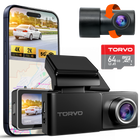
If you're comparing features while shopping for a dash camera, the TORVO TD3 Dash Cam provides an example of how several of these technologies can be combined into one system.
The TD3 features 4K front recording and a 2K rear camera, along with a 3.2-inch IPS display, a 170-degree wide-angle view, built-in Wi-Fi and GPS, 24-hour parking monitoring, and support for memory cards up to 256GB. These specifications are listed on the current TORVO product page.
That combination illustrates an important point about choosing a dash cam: the camera itself is only one part of the system. Recording quality, rear coverage, storage, connectivity, installation, and parking functionality all affect how useful the camera will be in everyday driving.
Common Dash Cam Questions
Is a dash cam the same as a dashboard camera?
Yes. "Dash cam," "dashcam," "dashboard camera," and "dash board camera" are commonly used terms for an in-vehicle camera designed to record driving footage.
Does a dash cam record continuously?
Most dash cams are designed for continuous recording while they have power. Loop recording allows the camera to overwrite older unprotected clips when storage becomes full.
How long does dash cam footage last?
There is no single answer. It depends on the memory-card capacity, video resolution, frame rate, number of cameras, compression settings, and how much protected footage is stored.
Does a dash cam record audio?
Some dash cams have microphones and can record audio. Others allow audio recording to be disabled. Local laws concerning audio recording can vary, so check the rules applicable to your location.
Can a dash cam record the rear of the car?
Yes, if it is a dual-channel or multi-camera system. A front-only dash cam cannot record areas outside its field of view.
Does a dash cam need Wi-Fi?
No. Wi-Fi is generally a convenience feature for connecting the camera to a smartphone. A dash cam can record video to its memory card without Wi-Fi.
Does GPS mean the car can be tracked remotely?
No. GPS and remote tracking are different functions. GPS can provide location information associated with recordings, while remote tracking generally requires additional connectivity and services.
Can I use any microSD card in a dash cam?
Not necessarily. Always follow the camera manufacturer's requirements for card capacity and performance. Video recording requires sustained write performance, so an unsuitable card can cause recording problems.
Is 4K necessary for a dash cam?
Not for everyone. 4K can provide additional detail, but lens quality, exposure, night performance, frame rate, and image processing also affect the usefulness of the footage.
Does a dash cam protect my car while it is parked?
It can, if the camera supports parking mode and has an appropriate power source. Parking functionality varies considerably between models, so check exactly how the feature works before buying.
Final Takeaway
A dash cam is essentially a dedicated video recorder built for life on the road.
It records continuously while powered, stores footage in manageable clips, uses loop recording to manage storage, and can protect important recordings when an impact is detected. More advanced models add features such as GPS, Wi-Fi, rear cameras, higher-resolution recording, and parking monitoring.
The best choice is not necessarily the camera with the longest feature list. Think about how you drive, when you drive, what areas you want recorded, and how you plan to access important footage.
If you're ready to compare those features in a real-world product, explore the TORVO TD3 Dash Cam. You can also browse the TORVO Tips and Fix blog for additional guides covering dash cam installation, placement, parking mode, GPS, Wi-Fi, and video quality.
Comments (0)
Leave a reply