

Front and Rear Dash Cams: What Dual-Channel Recording Covers
A sudden brake, an unexpected lane change, or a car hitting your bumper while you are waiting at a traffic light can happen in seconds. If your dash cam only records the road ahead, you may have footage of the situation without a clear view of what happened behind you.
That is where a front rear dash cam setup makes a difference. By recording the road in front of your vehicle and the traffic behind it, a dual-channel dash cam provides two perspectives of the same journey. This additional coverage can help document collisions, aggressive driving, and other unexpected incidents.
But do you really need a rear dash cam? What does it record, how is it different from a standard rear camera for a car, and which features deserve your attention before you buy one?
Here is what drivers should know about dual-channel recording, its practical benefits, and its limitations.
What Is a Front and Rear Dash Cam?
A front and rear dash cam is a recording system that uses two cameras to capture video from different directions. The front camera typically mounts near the windshield and records the road ahead, while the rear camera records the area behind the vehicle.
Both cameras generally save footage to the same memory card or recording system, although the exact arrangement depends on the model.
This setup is commonly called a dual-channel dash cam. The term refers to two recording channels, not necessarily two separate screens or two independent devices.
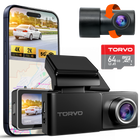
For example, the TORVO TD3 4K Dashcam records in 4K at the front and 2K at the rear. This gives drivers high-resolution footage from the front camera while also recording the road behind the vehicle.
The main purpose is straightforward: capture more of what happens around your car, including events that a front-facing camera cannot see.
What Does Dual-Channel Recording Actually Cover?
The value of a dual-channel system becomes clearer when you consider how different road incidents unfold.
The road ahead
The front camera records traffic, road conditions, vehicles entering your lane, sudden braking, and other events within its field of view.
Depending on the camera's resolution, lens, lighting, and mounting position, the footage may help identify vehicles, road markings, traffic signals, and other relevant details.
A higher resolution can preserve more image detail, but it does not guarantee that every license plate or distant object will be readable. Distance, motion, glare, and low-light conditions still matter.
Traffic behind your vehicle
The rear camera captures events outside the front camera's view. This is especially useful when another driver approaches too closely, changes lanes abruptly, or collides with your vehicle from behind.
Imagine you are stopped in slow-moving traffic when the vehicle behind you fails to brake in time. Your front camera may show that your car was stationary, but the rear footage could provide a clearer view of the approaching vehicle and the impact itself.
The rear recording may also help document tailgating, unsafe following distances, and some incidents involving drivers who leave the scene.
Two perspectives of the same incident
When both channels record correctly, their footage can help establish the sequence of events.
The front video might show your vehicle approaching an intersection, while the rear video captures a vehicle following closely before a collision. Reviewing the two views together may provide more context than either clip alone.
Keep in mind that video is evidence to be evaluated, not an automatic determination of fault. Camera angles, missing details, and local insurance or legal requirements can affect how footage is interpreted.
Do I Need a Rear Dash Cam?
You may not need one for every journey, but a rear camera is worth considering if you want to document incidents that happen behind your vehicle.
A front-only dash cam can be useful for recording events ahead. However, its field of view is limited to what the front-facing lens can see. A rear camera fills part of that gap.
A front and rear setup may be particularly useful if you:
- Drive in heavy traffic: Frequent braking, close following, and lane changes can create situations where the rear view matters.
- Commute on busy highways: A rear recording can help document certain rear-end collisions and incidents involving following vehicles.
- Park on public streets: If the system supports suitable parking recording and has power while the engine is off, it may capture some incidents involving the rear of your vehicle.
- Drive for rideshare or delivery services: Spending long hours on the road increases the number of situations you may want documented.
- Travel regularly with family: Broader road coverage may offer additional context if an incident occurs during a family trip.
- Own a larger vehicle: SUVs, hatchbacks, and other vehicles with different rear visibility characteristics may benefit from an appropriately positioned recording camera.
A rear dash cam is not essential for every driver. If you mainly take short trips and want basic evidence of events ahead, a front-only camera may meet your needs. The decision comes down to how much coverage you want and where you typically drive or park.
Front Dash Cam vs. Rear Dash Cam: What's the Difference?
Although they often work together, the two cameras have different jobs.
| Feature | Front dash cam | Rear dash cam |
|---|---|---|
| Primary view | Road ahead | Traffic and events behind |
| Common mounting position | Near the front windshield | Near the rear windshield |
| Useful for | Front collisions, road hazards, traffic events ahead | Rear-end collisions, following vehicles, rear incidents |
| Important image considerations | Headlight glare, distant details, changing light | Rear-window tint, defroster lines, low light |
| Main limitation | Cannot directly record most events behind the vehicle | Cannot directly record most events in front of the vehicle |
Neither camera provides a complete view of every side of the vehicle. Events outside the lens's field of view may not be captured, and objects can be obscured by other vehicles, window tint, or the vehicle's own structure.
The benefit comes from combining the two views, not assuming that either camera sees everything.
Rear Dash Cam vs. Rear Camera System for a Car
The terms sound similar, but a rear dash cam and a conventional backup camera serve different purposes.
A rear dash cam is designed primarily to record video. Its footage is usually saved for later review, and some models let you access clips through an app or display.
A conventional rear camera system for a car is designed to help the driver see behind the vehicle, particularly when reversing. It commonly displays a live image when reverse gear is selected.
According to the National Highway Traffic Safety Administration's overview of driver assistance technologies, a backup camera provides a view of the area directly behind a vehicle while reversing. NHTSA also emphasizes that backup cameras do not replace mirrors or the need to check your surroundings.
Here is how the two systems compare:
| Capability | Rear dash cam | Conventional backup camera |
|---|---|---|
| Main purpose | Record road events | Help the driver see while reversing |
| Saves footage for later | Generally yes | Not usually, unless connected to a recording system |
| Typical activation | Continuous driving recording or configured recording modes | Usually activates when reverse gear is selected |
| Useful for documenting collisions | Yes, if the event is captured and footage is preserved | Not necessarily |
| Helps with reversing maneuvers | May provide a view, depending on the setup | Specifically designed to assist with rear visibility |
If your vehicle already has a backup camera, you may still benefit from a rear dash cam. One helps you maneuver, while the other creates a record of what happens.
Can a Front and Rear Dash Cam Record While Parked?
Yes, provided the dash cam supports parking mode and has an appropriate power source.
Parking mode allows compatible cameras to monitor the vehicle after the ignition is switched off. Depending on the system, recording may begin when an impact is detected, when movement enters the camera's view, or according to a time-lapse or low-power recording setting.
With front and rear coverage, the system may capture incidents at either end of the vehicle, such as a parking-lot collision or someone bumping the rear bumper.
However, dual-channel recording does not automatically mean 24-hour protection. A camera that loses power when you turn off the engine cannot continue recording simply because it has a rear lens.
Before relying on parking mode, check:
- Whether both cameras record in parking mode.
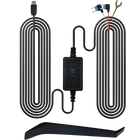
- Whether a compatible hardwire kit, OBD power cable, or dedicated battery pack is required.
- Whether the system has battery-protection features, such as a low-voltage cutoff.
- Which events trigger recording and how much footage is saved.
- Whether the memory card has enough capacity for the recording modes you use.
For a deeper explanation, read TORVO's guide to what dash cam parking mode is and how it works.
Parking recording can be useful, but it has limits. Camera coverage, available power, storage capacity, and the type of recording mode all affect whether an incident is captured.
What to Look for When Choosing a Rear Camera for Your Car
Not all dual-channel dash cams offer the same recording quality or convenience. Look beyond the headline resolution and consider how the complete system will work in your vehicle.
Front and rear video resolution
Check the resolution of both cameras separately. Some systems advertise high-resolution front recording while offering a lower resolution at the rear.
For instance, the TORVO TD3 combines 4K front recording with 2K rear recording. That specification is more informative than a product description that mentions only the front camera's resolution.
Resolution is only one part of image quality. A well-designed lens, a capable image sensor, and effective exposure handling also influence the usefulness of recorded footage.
Night recording performance
Nighttime footage can be harder to interpret because of headlight glare, street lighting, reflections, and motion blur.
Look for sample footage recorded in conditions similar to your usual driving environment. Pay attention to whether vehicles remain distinguishable and whether important details are visible when lighting changes.
Rear-window tint deserves particular attention. Darker glass can reduce the amount of light reaching the rear camera, which may affect nighttime recording.
Field of view and camera placement
A camera's field of view determines how much of the scene it captures. A wider view can include more surrounding traffic, although distant objects may appear smaller and fine details may be harder to distinguish.
For installation, a common starting point is the upper central area of the rear window, where the camera can capture a balanced view of the road. The ideal position depends on the vehicle's design, rear-window angle, tint, and defroster lines.
TORVO's guide on where to mount a dash cam for the best view provides additional placement considerations.
Storage and loop recording
Recording from two cameras generally uses more storage than recording from one, especially when both channels operate at high resolutions.
Many dash cams use loop recording, which overwrites older standard footage as the memory card fills. Important event clips may be protected, but you should not assume every camera saves them in the same way.
Choose a compatible memory card with sufficient capacity and a write-speed rating suitable for the camera. Regularly check that the system is recording correctly and that important clips can be retrieved.
Connectivity and footage access
Built-in Wi-Fi, an app, or an integrated display can make it easier to review and transfer footage after an incident.
GPS may also add useful location and speed information, depending on the model and settings. However, GPS does not guarantee that a recording is complete or that every detail can be verified.
Consider how easily you can locate, save, and share a clip when you need it. A camera that records reliably but makes footage difficult to retrieve may be less convenient during a stressful situation.
How to Install a Front and Rear Dash Cam
A dual-channel setup usually requires more installation work than a front-only camera because the rear camera must be connected to the recording system.
The exact procedure depends on the model, but these steps provide a practical starting point.
- Position the front camera. Mount it where it captures the road without obstructing your view.
- Mount the rear camera. Choose a position that provides a clear view through the rear window and avoids unnecessary interference from tint or defroster lines.
- Route the cable carefully. Follow the vehicle's interior trim where appropriate. Avoid interfering with airbags, moving components, pedals, or driver controls.
- Connect the cameras and power. Follow the manufacturer's wiring instructions, including any requirements for parking mode.
- Check both recording channels. Confirm that the front and rear footage is being saved and that both views are aimed correctly.
- Test footage access. Record a short drive, then review the clips to confirm image quality, timestamps, and storage behavior.
If you are unfamiliar with automotive wiring, professional installation may be the better option, particularly when a hardwire kit is involved. An incorrect installation can interfere with vehicle safety systems or damage wiring.
For more detailed guidance, see TORVO's step-by-step dash cam installation guide.
What a Dual-Channel Dash Cam Cannot Do
Two cameras provide broader coverage, but they do not eliminate every blind spot or guarantee usable evidence.
A rear camera may miss an incident if the view is obstructed, the lighting is poor, the camera is misaligned, or recording has stopped. A collision can also occur outside the camera's field of view.
Storage is another practical concern. If a clip is overwritten or fails to save, the system may not preserve the moment you need. After a collision, review and back up the relevant footage as soon as it is safe to do so.
Finally, recording does not establish fault by itself. Drivers, insurers, and authorities may need to consider the footage alongside other evidence.
Check local rules on camera placement, privacy, and audio recording before installation. Keep the camera positioned so it does not obstruct your view, and disable audio recording if required by the applicable rules or your circumstances.
Frequently Asked Questions
Do I need a rear dash cam if I already have a front dash cam?
A rear dash cam is worth considering if you want to record incidents behind your vehicle, including some rear-end collisions and unsafe following behavior. A front-only camera cannot directly capture most events behind it.
Does a rear dash cam record everything behind my car?
No. It records only what falls within its field of view. Other vehicles, window tint, darkness, glare, and obstructions can affect what appears in the footage.
Is a rear dash cam the same as a backup camera?
No. A rear dash cam records video for later review, while a backup camera generally displays the area behind the vehicle to help with reversing. Some vehicles may have systems that combine or extend these functions, but they are not automatically interchangeable.
Does a rear dash cam record when the car is off?
Only if the system supports parking mode and receives power while the vehicle is off. Depending on the setup, you may need a compatible hardwire kit or another approved power source.
Is a front and rear dash cam worth it for everyday driving?
For many drivers, it can be a useful upgrade. It provides footage from two directions and can help document incidents that a front-only camera would miss. Whether the extra coverage is worthwhile depends on your driving habits, budget, and installation requirements.
What resolution should I choose for a rear dash cam?
Compare the actual resolution of both recording channels, then consider night performance, lens quality, and storage requirements. A high-resolution specification is helpful, but it does not guarantee that every license plate or moving object will be clearly identifiable.
Can I use a rear dash cam with my existing car camera system?
Possibly. Compatibility depends on the devices, connectors, recording hardware, and power requirements. Check whether the rear camera is designed to work with your existing dash cam or requires a specific recording unit.
Final Thoughts: Is Dual-Channel Recording Right for You?
A front and rear dash cam gives you a more complete record of your journey by capturing events ahead of and behind your vehicle. That extra perspective can be useful when documenting rear-end collisions, traffic incidents, and certain parking-related events.
The best setup depends on your priorities. Look for reliable recording on both channels, good low-light performance, sufficient storage, convenient footage access, and an installation that suits your vehicle.
If you are comparing dual-channel options, explore the TORVO TD3 4K Dashcam, which offers 4K front and 2K rear recording. Review its specifications and confirm that its recording and parking features match the coverage you need before choosing a system.

Comments (0)
Leave a reply