

Where to Mount a Dash Cam for the Best View
Most dash cams get installed in about thirty seconds. The box comes open, the adhesive pad comes off, and the camera goes wherever looks about right. Nobody thinks about it again until the day they actually need the footage.
That’s when problems show up. The clip is two-thirds sky. The rearview mirror covers the left lane. The license plate you needed is a smear because the lens was looking through a tinted band of glass. The camera did its job. The placement didn’t.
This guide covers where to mount dash cams for the clearest view, how to position the lens, where to put a rear dash cam, which windshield zones are legal, and when it’s worth having one professionally installed. None of it is complicated, but a few inches in either direction make a real difference.
The Short Answer: High on the Windshield, Behind the Mirror
For most cars, the best place to mount dash cams is at the top center of the windshield, tucked behind or just beside the rearview mirror, usually nudged slightly toward the passenger side.
This spot wins for three practical reasons:
- It sees both lanes evenly. A centered camera captures the lane to your left and right in roughly equal measure, which matters when the incident happens beside you rather than in front of you.
- It stays out of your sight line. The mirror already blocks that patch of glass, so the camera adds almost nothing to your blind area. From the driver’s seat, a small camera there is close to invisible.
- It gets the highest vantage point. Height lets the lens look over the hood and see farther down the road, which helps with reading plates and signs.
One exception: if your dash cam has an interior-facing lens (common with rideshare setups), don’t bury it right behind the mirror. Garmin’s mounting guidance for its cabin-facing Tandem camera specifically warns against placing it behind or very close to the mirror, since the mirror will block the interior view. Shift it just below or to the side instead.
What “Best View” Actually Means
A good dashcam placement position isn’t only about the spot on the glass. It’s about what the lens sees through that glass. Before you commit, check four things.
Clean, clear glass. Many windshields have a black dotted border called the frit (a ceramic band that protects the adhesive holding the glass in place) and a tinted “shade band” along the top. Both cut light and add distortion. Keep the lens below them.
Wiper coverage. In rain, the only clear glass is the area your wipers sweep. A camera mounted above that arc will record a watery blur during exactly the kind of weather when crashes happen. Before sticking the mount, run the wipers and watch where they reach.
A level horizon. A tilted mount produces tilted footage. It’s easy to miss when the camera is in your hand and very noticeable on a laptop screen later.
Nothing in the frame that shouldn’t be. Toll tags, parking permits, inspection stickers, and the edge of the mirror housing can all creep into a wide-angle frame.

How to Angle the Lens
A reliable rule of thumb: the horizon should sit slightly above the middle of the frame, the road should fill most of the lower portion, and a thin strip of hood should be visible at the very bottom.
That sliver of hood is useful. It proves the footage came from your car and gives a fixed reference point when someone later asks how close another vehicle got. But don’t let it take over. Too much hood wastes resolution on paint. Too much sky causes another problem: a bright sky can trick the camera’s exposure into darkening the whole image, making the road and plates harder to read, especially at dawn and dusk.
Dash Cam Placement Options Compared
The behind-the-mirror spot isn’t the only option. Here’s how the common positions stack up.
| Position | View Quality | Driver Distraction | Legal Considerations | Best for |
|---|---|---|---|---|
| Top center, behind mirror | Excellent, balanced lanes, high vantage | Very low | Generally the most accepted zone | Most cars, most drivers |
| Lower passenger-side corner | Good, but off-center and lower | Low | Specifically permitted in some states, such as California | Cars with no room near the mirror |
| Lower driver-side corner | Fair, skewed view and more hood | Moderate | Allowed in some states with size limits | A backup option only |
| Dashboard | Fair to good, prone to glare and vibration | Low to moderate | Usually avoids windshield rules, but check local obstruction laws | Leased cars, windshield-restricted setups, trucks with deep dashes |
| Rearview mirror stem mount or mirror-style cam | Good | Very low | Varies by state | Drivers who want no adhesive on the glass |
Is Mounting a Dash Cam on the Dashboard a Good Idea?
It can work, but it’s usually a compromise.
The appeal is simple: nothing touches the windshield. That matters in a leased car, in a vehicle with an expensive heated or sensor-packed windshield, or in places where windshield-mounted devices are tightly restricted. In California, for example, dashboard mounting isn’t subject to the same windshield size zones, as long as the camera doesn’t block your view.
The downsides are real, though:
- Reflections. A dashboard-mounted lens looks through the windshield at a shallow angle, so light-colored items on the dash (papers, a phone, even stitching) can reflect into the footage. A dark dash mat helps.
- Vibration. Dashboards flex more than glass. Cheaper mounts transmit that shake straight into the video.
- A lower viewpoint. The camera sees less of the road ahead and more of your hood.
- Heat. A dash cam sitting on a dashboard in direct summer sun gets very hot. Check your camera’s operating temperature range.
If you go this route, use a weighted, non-slip base or a proper dashboard mount, place it as close to the windshield and as centered as possible, and do a test drive on rough pavement before trusting it.
Where to Put Rear Dash Cam
For a rear camera, the default is the top center of the rear window. That position gives the widest, most symmetrical view of traffic behind you and keeps the lens above headrests and cargo.
A few vehicle-specific issues come up often:
Defroster lines. Those thin horizontal wires can show up as lines across your footage. The best fix is getting the lens as close to the glass as possible, positioned between two lines. If you can’t avoid them entirely, aim so any visible line falls in the top or bottom third of the frame rather than straight through the middle. Try not to place adhesive directly across the wires, since removing it later can damage them.
Tinted rear glass. Factory privacy glass and aftermarket tint both reduce the light reaching the lens, which mainly hurts night footage. Some cameras let you raise exposure for the rear channel to compensate. If your rear glass has aftermarket film, be aware that adhesive stuck to the film may damage it on removal.
Hatchbacks and SUVs. When the camera is on the liftgate glass, the cable must cross the hinge. Leave enough slack in the rubber boot or channel so it doesn’t pinch or strain every time the hatch opens.
Pickup trucks. A camera on the rear cab glass will see a lot of truck bed. That’s not all bad (it can capture someone helping themselves to your cargo), but it narrows the view of traffic. Sliding rear windows also complicate mounting, so choose a fixed panel or a spot on the frame.
Exterior license-plate cameras. Some kits include a waterproof rear camera that mounts outside near the plate. It sidesteps tint and defroster lines entirely, but the lens gets dirty, and the install is more involved.

Legal Rules: Where You Can Mount a Dash Cam
Dash cams are legal to own across the US, but where you put one can be regulated. For passenger cars, there’s no single national placement rule. Instead, most states have general laws against objects that obstruct the driver’s view, and a handful spell out specific zones.
California is the most detailed example. Under California Vehicle Code Section 26708, a video event recorder may be mounted in one of three windshield areas:
| California zone | Maximum size |
|---|---|
| Lower corner farthest from the driver (passenger side) | 7-inch square |
| Lower corner nearest the driver, outside the airbag deployment zone | 5-inch square |
| Center of the uppermost portion of the windshield | 5-inch square |
California also requires a posted notice in the vehicle if the camera records, and its two-party consent law means passengers must know whether audio is being captured. If you’d rather avoid the question, most cameras let you switch audio recording off.
One wrinkle worth knowing: the statute’s definition of a “video event recorder” was written around cameras that save footage only when triggered. Many modern dash cams record continuously, and some legal commentators note this sits awkwardly with the letter of the law. In practice, placement within the zones is the part drivers most need to get right.
Commercial vehicles follow federal rules. For trucks and buses covered by FMCSA regulations, 49 CFR 393.60(e)(1) allows vehicle safety technologies such as dash cams on the windshield if they sit no more than 8.5 inches below the upper edge of the wiper-swept area, or no more than 7 inches above its lower edge, and stay outside the driver’s sight lines to the road, signs, and signals. The 8.5-inch allowance came from a 2022 rule change that expanded the older 4-inch limit.
For other states, check your state DMV or vehicle code before installing. This section is general information, not legal advice.
How to Mount a Dash Cam Step by Step
Here’s the process that avoids most regrets:
- Test before you stick. Power the camera on and hold it against the glass where you plan to mount it. Check the live view on the screen or through the companion app.
- Sit in your normal driving position. Make sure the camera doesn’t intrude on your view of the road, and that the mirror still adjusts freely.
- Clean the glass. Use rubbing alcohol and a lint-free cloth. Any film, wax, or dust weakens the adhesive.
- Mind the temperature. Adhesive bonds poorly on cold glass. Garmin’s instructions, for example, call for ambient temperatures between 70°F and 100°F when installing its adhesive mount. In winter, warm the cabin first.
- Press and hold. Apply firm pressure for around 30 seconds, then let the adhesive cure before hanging the camera’s weight on it if your manufacturer recommends it.
- Route the cable (more on this below).
- Fine-tune the angle and lock it. Level the horizon and set the hood strip.
- Record a test drive. Review both daytime and nighttime clips on a larger screen. Check that plates are readable a car length or two ahead.
Routing the Power Cable Safely
A dangling cable looks messy and can distract you, but safe routing matters more than tidiness. The usual path runs along the headliner, down the A-pillar (the pillar between the windshield and the front door), along the door weatherstrip, and under the dashboard to the power source.
The A-pillar deserves care because many modern cars house a side curtain airbag there. BlackboxMyCar’s guidance on dash cams and airbags advises against zip-tying cables directly to an airbag, and recommends avoiding airbag-related fuses entirely if you hardwire into the fuse box. Tucking the cable into the weatherstrip, or running it behind the airbag rather than across its deployment path, is the safer approach.
One more thing to check: many newer cars have a camera housing behind the rearview mirror for lane-keeping or automatic emergency braking. Don’t let your dash cam or its cable block that sensor’s view. Your owner’s manual will show where it sits.
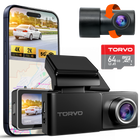
Applying This to the Torvo TD3
If you’re installing the TORVO TD3 dash cam, a few of its listed features affect placement choices directly.
- 170° wide-angle lens. A lens that wide rewards a centered mount. Offset it too far toward either side, and you’ll capture more of the A-pillar and less of the lane on the opposite side.
- Built-in Wi-Fi. You can check the live view on your phone while holding the camera in place, which makes the “test before you stick” step much easier.
- Built-in GPS. GPS reception generally benefits from a high position with a clear view of the sky, another point in favor of the top-center spot, below any heavy tint band.
- 3.2-inch IPS display. Mounting the camera behind the mirror keeps the screen out of your eyeline while driving, which is where you want it.
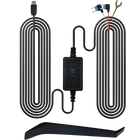
- 24-hour parking monitoring. Parking modes on most dash cams need power while the car is off, which often means a hardwire kit. Check the TD3’s manual for how its parking mode is powered before you plan the cable route.
DIY or Professional? Getting a Dash Camera Installed Near You
A single front camera powered from a 12V socket is a comfortable DIY job for most people. Things get more involved when you want:
- Hardwired power for parking mode
- A rear camera cable run through the headliner and a liftgate
- Clean routing around curtain airbags
- Installation in a vehicle with complex trim, sensors, or an EV electrical system
If you’re searching for dash cameras installed near you, car audio and mobile electronics shops are usually the best places to start, since they handle trim removal and fuse-box wiring every day. Before booking, ask:
- Which fuse will you tap, and is it switched or constant power?
- How will you route the cable around the airbags?
- Where will the rear camera go, and how will you handle defroster lines or tint?
- Will you test recording, parking mode, and the app before I leave?
A good installer will answer all four without hesitation. Bring the camera’s manual along, since parking mode settings and power requirements differ between models.
Common Dash Cam Placement Mistakes
- Mounting in the middle of the windshield, directly in your line of sight
- Placing the lens behind the frit or tint band
- Mounting above the wiper sweep, so rain footage is unusable
- Angling too low (all hood) or too high (all sky)
- Leaving a cable loop hanging near the mirror or steering wheel
- Relying on a suction cup in a hot climate, where it may lose grip
- Blocking the car’s driver-assistance camera behind the mirror
- Skipping the test drive and discovering problems after an incident
Frequently Asked Questions
What is the best place to mount a dash cam on the windshield?
The top center of the windshield, behind or just beside the rearview mirror, within the wiper-swept area and below any tinted band. It offers the most balanced view with the least distraction.
Should a dash cam go on the driver or passenger side?
Center is ideal. If the mirror area doesn’t work, lean toward the passenger side. It keeps the camera out of your sight line, and some states, including California, allow a larger device in the lower passenger-side corner than on the driver’s side.
Can I mount my dash cam on the dashboard instead?
Yes. It avoids windshield placement rules in some places, but expect more glare and vibration and a lower viewpoint. A dark dash mat and a stable, weighted mount help.
Is it illegal to mount a dash cam in the middle of the windshield?
In many states, a device that obstructs your view of the road can be cited under general obstruction laws. Some states list specific permitted zones. Check your state’s vehicle code before installing.
Where should I put a rear dash cam?
Top center of the rear window, positioned between defroster lines if possible. On hatchbacks and SUVs, leave slack in the cable where it crosses the liftgate hinge.
Do rear defroster lines ruin footage?
They can add visible lines. Mounting the lens flush against the glass between wires usually solves it, and the lines don’t damage the camera.
How much of the hood should appear in the frame?
Just a thin strip at the bottom. It serves as a reference point without wasting resolution.
Final Thoughts
The best place for dash cams is usually the least noticeable one: high, centered, behind the mirror, looking through clean glass that your wipers reach. Add a level horizon, a sliver of hood, a rear camera placed between the defroster lines, and a cable routed clear of the airbags, and you’ve got footage that will actually hold up when it matters.
Take ten minutes to test the view before the adhesive touches glass. It’s much easier than peeling off a mount later. And if your setup involves hardwiring or a rear camera, a professional install is money well spent.

Comments (0)
Leave a reply