

What Is a Dash Cam With Parking Mode?
Imagine this: you come back to your car after a long day at work, and there’s a fresh dent in the rear bumper. No note, no witnesses, nobody around. Your dash cam was sitting right there on the windshield the whole time, but it only recorded while you were driving.
That’s exactly the gap parking mode fills. A dash cam with parking mode keeps watching after you switch off the engine, so a door ding, a hit-and-run in a parking lot, or a break-in attempt has a chance of ending up on video instead of staying a mystery.
This guide explains what parking mode on a dash cam actually does, the different recording types, how the camera stays powered without killing your car battery, and what separates a good parking mode dash cam from one that just lists the feature on the box.
What Is Parking Mode on Dash Cam?
Parking mode is any recording a dash cam does while your vehicle is parked and the ignition is off. Depending on the brand, you’ll also see it called parking monitor, parking surveillance, or parking guard. The idea is the same: capture evidence when you’re not in the car.
In normal driving mode, a dash cam records continuously and loops over old files as the memory card fills. In parking mode, it switches to a lower-power way of watching the car, usually saving clips only when something happens.
There are two common ways a dash cam knows it’s time to switch:
- Ignition signal. When the camera is hardwired, it senses the moment the ignition (often labeled ACC, for accessory power) turns off and goes straight into parking mode.
- Motion sensor. Some cameras use their built-in accelerometer instead. BlackVue, for example, says its cameras can enter parking mode after the sensor detects the vehicle has been stationary for five minutes.

How Parking Mode Detects an Incident
Most parking mode dash cams rely on one or both of these triggers.
Impact detection (G-sensor). A G-sensor is a small accelerometer inside the camera that measures sudden movement. If another car bumps yours or someone forces a door, the jolt triggers a recording, and the clip is typically saved in a protected folder so it isn’t overwritten.
Motion detection. The camera watches its own field of view and records when something moves in front of the lens. It’s good at catching someone walking up to your car before any contact happens. The downside is false alarms: trees, rain, and passing traffic can set it off. VIOFO, for instance, suggests a low motion sensitivity setting so wind or rain doesn’t keep triggering clips.
The Main Types of Parking Mode Recording
Not every dash cam with parking mode records the same way. The type makes a real difference to what you’ll actually see when you play the footage back.
| Parking mode type | How it records | Strengths | Trade-offs |
|---|---|---|---|
| Event-only (impact or motion) | Sleeps or idles, then starts recording after a trigger | Lowest power use, small files | The camera can take a few seconds to start, so the key moment may be missed |
| Time-lapse | Records continuously at a very low frame rate | A complete timeline of everything around the car, very storage-efficient | Choppy video, usually no audio, fine detail can be lost |
| Buffered | Records into short-term memory nonstop, and saves only when triggered | Clips include the seconds before and after the event | Uses more power than event-only |
| Low-bitrate continuous | Records full-motion video at reduced quality | Nothing is skipped | Fills the card and uses power faster |
Time-lapse is a good example of how different these modes feel. BlackVue’s time-lapse mode records at one frame per second, so each one-minute file covers about 30 minutes of real time. You can scroll through an entire afternoon in a few minutes.
Buffered recording is the one most people end up preferring, because it solves the “camera woke up too late” problem. The camera is always holding the last few seconds in memory, so when a car clips your mirror, the saved clip shows the car approaching, not just the aftermath. Some cameras combine modes, running time-lapse and switching to a full-quality buffered clip the moment an impact is detected.
How a Dash Cam Stays Powered When the Car Is Off
This is the part many buyers miss. Parking mode needs power, and most vehicles cut power to the 12V (cigarette lighter) socket when the ignition turns off. Plug a dash cam in there and, in many cars, it simply shuts down when you do.
There are three common ways to power a car camera with parking mode:
| Power option | How it works | Best for | Keep in mind |
|---|---|---|---|
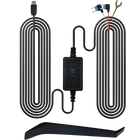
| Hardwire kit | Connects to the fuse box with constant power, ignition (ACC) power, and ground wires | Everyday parking at home or work | Takes some install time; many owners use a professional installer |
| OBD-II power cable | Plugs into the car’s diagnostic port under the dash | Easier install without fuse taps | Check that it’s compatible with your vehicle and camera |
| Dash cam battery pack | A separate battery charges while you drive and powers the camera when parked | Long parking sessions, protecting the car’s battery | Extra cost and another device to mount |
A hardwire kit is the most common route. The constant-power wire keeps the camera alive when the car is off, while the ignition wire tells it when to switch between driving and parking mode. If you’re new to installing a camera, our step-by-step dash cam installation guide walks through routing cables and mounting cleanly.
Will Parking Mode Drain Your Car Battery?
It can, if it’s set up without protection. That’s why good hardwire kits and many cameras include a low-voltage cutoff. The kit monitors your car battery’s voltage and cuts power to the camera when it drops to a set level, leaving enough charge to start the engine.
BlackVue says most of its cameras and accessories let you set that cutoff between 12.0V and 12.5V. A lower number means longer recording; a higher number means more protection for the battery. For one popular kit, BlackboxMyCar notes that a 12.0V cutoff gives about 6 to 8 hours of parking recording in most vehicles, and recommends raising it to 12.4V in very cold weather, when batteries have less to spare.
A few habits help too:
- If you mostly take short trips, your battery may not fully recharge between parking sessions. Choose a more conservative cutoff.
- Older batteries hold less charge. If your battery is several years old, start higher and adjust.
- If you park for days at a time (at an airport, for example), a dedicated dash cam battery pack is the safer choice.
- Event-only modes use less power than time-lapse or low-bitrate recording, which buys you more hours.
Supercapacitor or Battery: What Powers the Camera Itself
Dash cams also contain their own small power source, and it matters for parking mode.
A supercapacitor is an energy store that handles heat and cold much better than a typical lithium-ion battery and tends to last longer in a hot car. The catch: it only holds enough energy to save the current file safely when power is cut, not to run the camera. A supercapacitor dash cam needs a hardwire kit, OBD-II cable, or battery pack for parking mode.
A built-in lithium-ion battery can run a camera for a while on its own, but sits against a windshield that can get very hot in summer, which speeds up battery wear.
If you live somewhere hot and park outside, heat tolerance is worth checking on the spec sheet before anything else.
Why a Front and Rear Dash Cam With Parking Mode Makes Sense
A front-only camera sees what’s in front of the windshield. In a parking lot, though, plenty happens behind you: someone reversing out of the next row, a car misjudging a tight spot, a shopping cart rolling into your bumper.

A front and rear dash cam with parking mode covers both ends of the car. The trade-offs are straightforward: two cameras draw more power and fill the memory card faster, so a larger card and a sensible low-voltage cutoff matter even more.
What to Look For in the Best Parking Mode Dash Cam
The best dash cam parking mode setup depends on where you park, but these features separate a genuinely useful one from a checkbox feature:
- More than one parking mode. Buffered recording is the most useful; time-lapse is handy for busy lots.
- Adjustable sensitivity. You’ll want to tune the G-sensor and motion detection so you’re not buried in false alarms.
- Front and rear coverage. Especially if you park on the street or in shared lots.
- Good night video. Parked cars spend a lot of time in dim garages and on dark streets. Look at real night samples, not just daytime clips.
- Enough storage. A high-capacity memory card and loop recording, with event clips protected from being overwritten.
- Battery protection. Low-voltage cutoff, either built into the camera or in the hardwire kit.
- Heat tolerance. A wide operating temperature range, or a supercapacitor, if your car sits in the sun.
- Easy review. Wi-Fi and a phone app make it much easier to find and save a clip than pulling the memory card.
Setting Up Parking Mode: A Quick Walkthrough
| Step | What to do |
|---|---|
| 1 | Confirm your camera supports parking mode and check which power accessory it needs |
| 2 | Install the hardwire kit, OBD-II cable, or battery pack (or have a professional do it) |
| 3 | Set the low-voltage cutoff to suit your battery age and climate |
| 4 | Turn on parking mode in the camera or app, and choose the recording type |
| 5 | Adjust impact and motion sensitivity for where you usually park |
| 6 | Format the memory card in the camera so it starts fresh |
| 7 | Test it: park, walk past or tap the car gently, then check that the clip saved |
Camera placement affects parking footage too. A camera tucked behind the rearview mirror with a clear view of the hood and the lane ahead will capture more useful detail. See our guide on where to mount a dash cam for the best view.
Limitations Worth Knowing
Parking mode is useful, but it isn’t a security system. It won’t stop a theft, and a determined thief may take the camera with them. Busy parking areas can trigger dozens of motion clips a day, and time-lapse footage can be too choppy to read a license plate from a car moving quickly. Treat it as a witness, not a guard, and set expectations accordingly.
Where the TORVO TD3 Fits
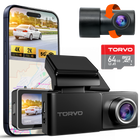
If you’re shopping for a dash cam with parking mode, the TORVO TD3 Dash Cam lists a 24H parking monitor alongside 4K video, a 170° wide-angle lens, built-in Wi-Fi and GPS, a 3.2-inch IPS display, and support for memory cards up to 256GB. Wi-Fi means you can pull clips to your phone after an incident, and GPS adds location and speed data to your footage. Before you set up 24-hour monitoring, check which power accessory TORVO recommends for parking mode on your vehicle.
Frequently Asked Questions
What is parking mode on a dash cam?
It’s a setting that lets the dash cam keep monitoring your car after the engine is off. It records when it senses an impact or motion, or records continuously at a low frame rate, depending on the mode.
Does a dash cam with parking mode drain the car battery?
It draws some power, but a hardwire kit or camera with low-voltage cutoff shuts it off before the battery gets too low to start the car. Choose a higher cutoff in cold weather or with an older battery.
Do I need a hardwire kit for parking mode?
Usually, yes, or an OBD-II cable or dash cam battery pack. Most cars cut power to the cigarette lighter socket when the ignition is off, so a plug-in cable alone often isn’t enough.
How long can a dash cam record in parking mode?
It depends on the recording type, how many cameras are running, your battery, and the cutoff voltage. A few hours to a full night is common with a hardwire kit; a battery pack can extend that considerably.
Does parking mode record audio?
It depends on the camera and the mode. Time-lapse recordings often have no audio, while event clips may include it. Audio recording laws vary by state, so check the rules where you drive and park.
Is a front and rear dash cam with parking mode worth it?
For many drivers, yes. A lot can happen behind a parked car, from someone reversing out of the next space to a misjudged parallel park, and a front-only camera can’t see any of it.
The Bottom Line
A dash cam with parking mode turns your camera from a driving recorder into a witness that’s still on duty after you walk away. For it to work well, you need three things: the right recording mode (buffered is a strong default), a reliable power source with low-voltage protection, and coverage that fits where you park.
If you’re new to dash cams, start with how dash cams work, then check out the TORVO TD3 Dash Cam when you’re ready to choose one. You’ll find more setup help on the TORVO Tips and Fix blog.

Comments (0)
Leave a reply