

How Dash Cams Work: A Beginner's Guide
A dash cam records your drive from the moment you start the engine, saves that video to a memory card as a series of short clips, and overwrites the oldest ones once the card fills up. If it feels a sudden jolt, it locks the clip covering that moment so the loop can’t erase it.
That’s how a dash cam works, in two sentences. What separates a camera you can count on from one that lets you down is everything around that loop: how well it sees at night, whether it keeps watching while you’re parked, how long a clip survives before it’s overwritten, and whether it records inside the car as well as the road ahead. This guide takes each one in turn.
How Does a Dash Cam Work? The Short Version
A dash cam (or dashcam) is a compact video recorder that mounts to your windshield or dashboard and films the road while you drive. It has three core jobs: capture clear video, keep recording without running out of space, and protect the clips that matter. Here’s how those jobs play out on an ordinary trip.
| When | What the dash cam does |
|---|---|
| You start the car | Power arrives through the 12V socket, a USB port, or a hardwire kit. The camera boots up and starts recording on its own. |
| You’re driving | The lens and image sensor capture the scene, and the processor compresses it into short video files (often one, three, or five minutes long) saved to a microSD card. |
| The card fills up | Loop recording deletes the oldest unprotected file to make room for new footage. |
| Something jolts the car | A built-in motion sensor called the G-sensor detects the sudden force and locks the current clip so it can’t be overwritten. |
| You turn off the engine | A small backup power source keeps the camera alive just long enough to finish saving the last file. With constant power, the camera can switch to parking mode instead. |
| You need a clip | You watch it on the camera’s screen, download it to your phone over Wi-Fi, or copy it from the card to a computer. |
Everything else, from night vision to phone apps, builds on that routine.

What’s Inside a Dash Cam
To understand how dash cameras work, it helps to know the handful of parts doing the heavy lifting. Strip away the plastic housing and you’ll find something close to a smartphone camera, tuned for one very specific job.
The Lens
The lens sets the field of view, measured in degrees. A wider angle captures more of what’s happening along the sides of your car, like a vehicle drifting in from the next lane. There’s a trade-off, though. The wider the view, the more of the scene each pixel has to cover, so distant details such as license plates look smaller, and straight lines near the edges start to curve.
The Image Sensor
Behind the lens sits a CMOS image sensor, a chip packed with millions of tiny photodiodes that turn incoming light into electrical signals. Resolution gets most of the marketing attention, but the sensor’s sensitivity often decides whether night footage is usable. Sony’s STARVIS sensors, which the company develops for security cameras and also promotes for dashboard cameras, use a back-illuminated design. The photodiodes sit above the chip’s wiring layer rather than beneath it, so less light gets blocked on the way in.
The Processor
Uncompressed 4K video would swamp a memory card within minutes, so the processor compresses footage as it records, usually with the H.264 standard or its newer successor, H.265. That upgrade matters for storage. Fraunhofer HHI, which helped develop the standard, puts H.265 at roughly half the bitrate of H.264 for the same perceived quality. In plain terms, more footage fits on the same card. The processor handles the finishing touches too: stamping the date and time, applying wide dynamic range (WDR) or HDR processing to balance bright headlights against dark shadows, and splitting the stream into files.
The MicroSD Card
Every clip lands on a removable microSD card, which often isn’t included in the box. The card works harder than you might expect, because a dash cam writes, deletes, and rewrites data for as long as the car is running. Two labels are worth checking:
- Speed class. The SD Association’s Video Speed Class ratings (V6, V10, V30, V60, and V90) indicate a minimum write speed in megabytes per second. Match or exceed what your camera’s manual asks for. V30 is the usual choice for 4K recording.
- Endurance. Cards sold as “high endurance” are designed for constant rewriting, which is exactly the workload a dash cam creates.
Power and Backup
Most dash cams draw power from the car’s 12V socket or a USB port, which is why they come to life when you start the engine. Inside, a small battery or supercapacitor (a component that stores a quick burst of energy) acts as a safety net. Its job isn’t to run the camera for hours. It supplies just enough power for the camera to close the current file cleanly when the car shuts off, so the final clip isn’t corrupted.
Many manufacturers favor supercapacitors because they cope with heat better than lithium-ion batteries, and a parked car heats up fast. The National Highway Traffic Safety Administration warns that a vehicle’s interior can climb 20 degrees in as little as 10 minutes.
How Does a Dash Cam Decide What to Keep?
A camera that saved every minute of every drive would fill any memory card within days. Two features work together to prevent that.
Loop Recording
Loop recording treats the card like a conveyor belt. The camera saves video in short segments, and once the card is full, it overwrites the oldest clip that isn’t protected. You never have to delete anything by hand, and the camera never stops because it ran out of room.
How long the loop lasts depends on card size, resolution, and compression. For a sense of scale, a 2023 forensic study of dash cams put a 32 GB card at roughly 300 minutes of 1080p footage at 30 frames per second, stored as 100 three-minute files. Recording in 4K fills that same card much faster, while H.265 compression stretches it further.
The catch is that ordinary footage has a shelf life. Imagine someone scrapes your door in a grocery store parking lot on Monday, and you don’t check the card until Friday. If nothing flagged that moment, it may already be gone.
The G-sensor
That’s the job of the G-sensor, an accelerometer similar to the one that rotates your phone’s screen. It constantly measures force in three directions: forward and back, side to side, and up and down. When a jolt crosses the sensitivity threshold, as it would in a collision, the camera saves the current recording as a protected file that loop recording can’t touch. There’s usually a button for saving a clip manually, too.
Many cameras also hold a few seconds of video in a rolling buffer, so a locked clip shows the moments leading up to the impact, not just the aftermath.
Sensitivity takes a little tuning. Set it too high and every pothole or speed bump creates a locked file, and those files slowly eat into the space left for everyday recording. Set it too low and a gentle parking-lot tap may not register. Medium is a sensible place to start.
Does a Dash Cam Record When the Car Is Off?
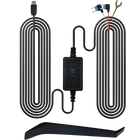
Only if it still has power. On most vehicles, the 12V socket switches off with the ignition, so a camera plugged into it shuts down when you park. To keep watch over a parked car, you need a camera with parking mode and a power source that stays on.
Parking mode doesn’t film nonstop. The camera waits in a low-power standby and saves video when it detects motion in front of the lens or a bump through the G-sensor. Some models offer a time-lapse option instead, recording continuously at a very low frame rate to save power and storage.
| Power source | Records while parked? | What to know |
|---|---|---|
| 12V socket or USB port | Usually no | Plug-and-play, but most sockets lose power when the engine is off. |
| Hardwire kit | Yes | Connects to the fuse box for constant power. Choose one with a low-voltage cutoff. |
| OBD-II power cable | Yes, if your car and camera support it | Plugs into the diagnostic port under the dashboard, with no fuse-box wiring. |
| Dash cam battery pack | Yes | Charges while you drive and powers the camera when parked, sparing the car battery. |
The main risk with constant power is a drained battery. A low-voltage cutoff shuts the camera down before the battery falls too low to start the engine, and Consumer Reports recommends disconnecting the dash cam if the car will sit for many days.
Does a Dash Cam Record Inside the Car?
A standard dash cam faces forward through the windshield, so it won’t capture video of you or your passengers. It usually does record audio inside the car, though, unless you switch the microphone off. Recording the cabin on video takes an interior-facing camera, either built in as a second channel or added as an accessory.
| Setup | What it records | Who it suits |
|---|---|---|
| Front only (1-channel) | The road ahead, plus cabin audio if the mic is on | Everyday commuters |
| Front and rear (2-channel) | The road ahead and traffic behind you | Drivers worried about rear-end collisions |
| Front and cabin (2-channel) | The road ahead and the interior | Rideshare drivers and parents of teen drivers |
| Front, cabin, and rear (3-channel) | All three views at once | Drivers who want the most complete record |
If you want every angle covered, the TORVO TD4 3-channel dash cam pairs a 4K front camera with 2K rear and 2K cabin cameras.
How Do Cabin Cameras See in the Dark?
At night, a car’s interior is close to pitch black. Cabin cameras usually handle this with small infrared LEDs that light the interior with near-infrared light, which camera sensors can detect but human eyes can’t. The driver isn’t dazzled, and passengers don’t notice a glow. One side effect: infrared footage is typically black and white, because the scene is lit by infrared rather than visible light.
Audio and Passenger Privacy
Dash cams are legal in all 50 states, but recording conversations is a separate question. Some states need only one person’s consent, while others require consent from everyone involved. The Reporters Committee for Freedom of the Press keeps a state-by-state guide worth bookmarking.
California adds its own twist. Under a 2010 change to its windshield law, a vehicle with a video event recorder must display a notice that a passenger’s conversation may be recorded. If you regularly carry passengers, the simplest approach is to tell them the camera is on, or mute the microphone.
Resolution, Frame Rate, and Night Footage
Resolution decides how much detail you can pull from a frame. In Consumer Reports’ testing, 4K footage made street signs and license plates noticeably easier to read than 1080p, and the gap widened at night.
Frame rate, measured in frames per second (fps), decides how smooth motion looks. A higher rate like 60 fps suits fast highway driving, while 30 fps tends to produce a brighter picture after dark. You usually get one or the other: the 4K models Consumer Reports tested dropped to 1440p or 1080p once 60 fps was selected.
Lighting is the other variable. WDR and HDR processing help when a scene mixes very bright and very dark areas, such as oncoming headlights on an unlit road. A polarizing lens filter can cut daytime glare off the windshield, though it makes night footage slightly dimmer.
GPS, Wi-Fi, and Getting Footage Off the Camera
A built-in GPS receiver adds your speed and location to each recording, which helps show exactly where and when something happened. If you’d rather not display your speed on the footage, many cameras let you hide that overlay.
Wi-Fi works differently than many people assume. On most Wi-Fi dash cams, the camera broadcasts its own short-range network, and your phone connects to it directly through the manufacturer’s app. You can browse clips, save them to your phone, and change settings without touching the memory card, and no internet connection is involved. Checking a live view from miles away is a separate feature that depends on a cellular data connection.
The memory card is always a fallback. Turn the camera off, remove the card, and copy the files with a card reader. Cutting power before you pull the card lowers the risk of corrupting it.
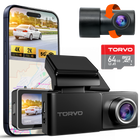
The TORVO TD3 dash cam bundles most of these features into one compact unit: 4K recording, a 170-degree lens, built-in GPS and Wi-Fi, a 3.2-inch IPS screen, 24-hour parking monitoring, and support for cards up to 256 GB.

Habits That Keep Your Dash Cam Reliable
Because a dash cam is so easy to forget, a few quick habits go a long way:
- Format the card every few weeks in the camera’s own menu. Constant deleting and rewriting fragments a card over time, and the SD Association notes that writing to fragmented space is generally slower. Save anything you want to keep first.
- Save important clips right away. Lock them or download them before loop recording catches up.
- Clear out old locked files. They’re protected from overwriting, so they quietly shrink the space left for new footage.
- Confirm the date and time. Accurate timestamps make footage more useful as evidence, and GPS models can set the clock automatically.
- Mount it high and out of your sightline. Behind the rearview mirror is the usual spot. California, for example, allows a video event recorder in a 5-inch square at the top center of the windshield or in small zones in the lower corners.
- Watch a clip now and then. A quick look confirms the lens is clean, the angle is right, and the camera hasn’t stopped recording without you noticing.
Frequently Asked Questions
Do dash cams record all the time?
Whenever they have power, yes. Most start automatically with the engine and keep recording until the car is switched off, relying on loop recording to manage space. Recording while parked requires parking mode and a constant power source.
Does a dash cam drain your car battery?
Not if it’s plugged into a socket that turns off with the ignition. Hardwired cameras draw power while parked, so use a setup with a low-voltage cutoff, and unplug the camera if the car won’t be driven for many days.
Do dash cams record audio?
Most do, through a built-in microphone, and most let you turn it off. Check your state’s consent rules before recording passengers.
Does a dash cam need Wi-Fi or internet to work?
No. Recording and saving happen entirely on the device. Wi-Fi is only for moving clips to your phone, and it usually works as a direct link between the camera and your phone rather than over the internet.
How long does a dash cam keep footage?
Until loop recording overwrites it, which can take anywhere from a few hours to several days depending on card size, video settings, and how much you drive. Locked clips stay put until you delete them.
Are dash cams legal in the US?
Yes. Dash cams are legal in all 50 states, but each state sets its own rules on where you can mount one and whether you can record audio without everyone’s consent.
The bottom line
Underneath the spec sheets, every dash cam runs the same simple routine: capture the road, keep recording by replacing old footage, and lock the moments that matter. Sensor quality, card endurance, power source, and which way the lenses face decide how well it handles that routine when something actually goes wrong.
Once you understand how dash cams work, comparing models gets much easier. Start with what you need, whether that’s sharp daytime detail, parking coverage, or a view of the cabin. If one camera with 4K, GPS, Wi-Fi, and parking monitoring fits the bill, take a closer look at the TORVO TD3.

Comments (0)
Leave a reply