

Do You Need a Dash Cam With GPS Tracking?
A dash cam can record what happens on the road, but adding GPS gives the footage another layer of information. Instead of having only a video clip, a GPS-enabled camera can associate recordings with information such as location, speed, and time.
That can be useful after a collision, during a road trip, or when reviewing exactly where an incident occurred.
But there is an important distinction that often gets overlooked: GPS in a dash cam is not automatically the same thing as live GPS tracking.
A basic dashcam with GPS may simply record location data along with the video. A connected dash cam with cellular service can potentially let you check the vehicle’s location remotely.
So, do you actually need a dash cam with GPS tracking?
The answer depends on how you use your vehicle and what you expect the camera to do.
What Does GPS Do on a Dash Cam?
A GPS-enabled dash cam has a GPS receiver that can determine the vehicle’s position while it is recording. Depending on the camera, GPS information can be stored alongside the video or displayed as an overlay.
For example, GPS-enabled Garmin dash cams can record the vehicle’s position and speed while recording video. Some systems can also use GPS information for other camera features.
A GPS dashcam may therefore provide information such as:
- Vehicle location
- Driving speed
- Date and time
- Route information
- GPS coordinates
- Trip history, depending on the camera and software
This makes a dash cam and GPS a useful combination when you need more context around a recording.
For example, imagine a driver has a video showing another vehicle entering an intersection. The video may show what happened, but GPS data can add information about where the recording took place and, depending on the system, the vehicle’s recorded speed.
GPS accuracy is not perfect, either. The U.S. government’s GPS.gov explains that positioning accuracy depends on factors such as satellite geometry, signal blockage, atmospheric conditions, and receiver design.
That is why GPS data should be treated as useful supporting information rather than an infallible measurement in every situation.
GPS Dash Cam vs. GPS Tracking Dash Cam
This is one of the most important distinctions to understand before buying a camera.
The phrase “GPS tracking dash cam” can refer to two different capabilities.

GPS logging
A conventional dash cam with GPS records GPS information while driving. That information may be embedded in the video or available through the camera’s playback software.
You typically review the information later.
This is sometimes called GPS logging or GPS data recording.
Live GPS tracking
A dash cam with live GPS tracking goes further. It can transmit location information through a cellular connection so you can access the vehicle’s current or recent location remotely.
That requires more than a GPS receiver.
You generally need:
- GPS positioning hardware
- A cellular or internet connection
- A cloud platform or mobile app
- Appropriate power while the vehicle is being monitored
For example, Garmin’s connected Dash Cam Live uses LTE connectivity for features including location tracking, remote live view, and theft alerts. Garmin also states that these connected features require an active LTE subscription.
BlackVue similarly describes cloud-connected dash cams that can provide real-time GPS tracking when the camera has an appropriate internet connection.
In other words, GPS on a dash cam does not automatically mean you can watch the vehicle’s location from anywhere.
That distinction can prevent a lot of confusion when comparing products.
What Are the Benefits of a Dash Cam With GPS?
For many drivers, GPS is not the feature that determines whether a dash cam is good. Video quality, reliability, night performance, storage, and installation still matter.
However, GPS can make recorded footage more informative.
1. Location information is attached to your footage
One of the simplest benefits of a GPS dash cam is that the recording can contain location information.
This can be helpful when reviewing footage from a long trip or trying to identify where an incident occurred.
Some manufacturers also allow users to view route information alongside recorded video. VIOFO, for example, describes its GPS functionality as recording speed, latitude, and altitude and allowing route information to be reviewed through compatible playback software.
2. Speed information can provide additional context
Some GPS dash cameras record the vehicle’s speed as part of the video data.
This can help you understand the circumstances surrounding a recording. However, GPS speed should not automatically be treated as a legally definitive measurement.
GPS.gov notes that speed accuracy depends on the receiver and environmental factors, just as positioning accuracy does.
3. Reviewing trips becomes easier
If you use your dash cam for frequent road trips, GPS information can turn a collection of video clips into a more useful record of where you traveled.
Some compatible systems can display or export GPS information from recordings, including route and speed information.
That can be particularly convenient when you have hours of footage and need to find a particular section.
4. GPS can support other dash cam features
GPS isn’t always used solely for displaying coordinates.
Some dash cams use GPS information as part of driver-assistance features. Garmin, for example, says certain models use GPS-estimated speed as part of their forward collision warning calculations.
The exact features vary significantly between models, so it is worth checking the manufacturer’s specifications rather than assuming every GPS dash cam works the same way.
When Does Live GPS Tracking Make Sense?
A standard GPS logger may be enough for an individual driver. Live tracking becomes more relevant when you need to know where a vehicle is while you are away from it.
Personal vehicles
Live tracking can be useful if you want to monitor the location of a vehicle remotely.
For example, connected dash cams may offer:
- Remote vehicle location
- Live camera viewing
- Parking notifications
- Theft-related alerts
- Remote access to selected recordings
These features usually depend on cellular connectivity and a compatible service.
Garmin’s connected camera documentation specifically notes that LTE features depend on cellular connectivity, reception, power, and other conditions.
Family vehicles
A connected vehicle tracking camera may also appeal to households with multiple drivers, especially when the vehicle is shared.
The important question is not simply whether the camera has GPS. Ask whether it provides the specific monitoring capability you need.
Commercial vehicles and fleets
This is where a fleet dash cam with GPS tracking can become significantly more useful.
A business may want to combine video with vehicle location and driving information to manage a fleet.
Fleet-oriented systems can combine:
- Camera footage
- Vehicle location
- Route information
- Driving history
- Event notifications
- Cellular connectivity
- Cloud-based video access
That creates a broader vehicle tracking and camera system rather than simply a dash cam that records video.
For larger fleets, the requirements can also include driver management, reporting, multiple cameras, cloud storage, and fleet-management software. A consumer GPS dash cam should not automatically be considered a replacement for a dedicated fleet telematics system.
Do You Need GPS If You Only Want Accident Evidence?
Not necessarily.
If your primary goal is simply to record the road in front of your vehicle, GPS is an additional feature rather than the core function.
The camera’s ability to consistently capture usable footage is still fundamental.
Before choosing a GPS dashcam, look at:
| Feature | Why it matters |
|---|---|
| Video resolution | Determines how much visual detail the camera captures |
| Night performance | Important for low-light and nighttime driving |
| Field of view | Determines how much of the surrounding road is visible |
| GPS | Adds location and potentially speed information |
| G-sensor | Helps detect and protect footage associated with impacts |
| Parking monitoring | Helps monitor the vehicle while parked, depending on installation |
| Storage capacity | Determines how much footage can be retained |
| Wi-Fi/app support | Makes transferring and reviewing clips easier |
| Cellular connectivity | Needed for many remote tracking features |
| Cloud service | Can enable remote storage and connected features |
So if you’re comparing dash cams with GPS, don’t let the GPS specification distract you from the fundamentals.
A camera with excellent GPS but poor nighttime video may not be particularly useful when you actually need the footage.
GPS Dash Cam vs. Live-Tracking Dash Cam
The difference becomes clearer when you look at the features side by side.
| Capability | GPS Dash Cam | Live GPS Tracking Dash Cam |
|---|---|---|
| Records driving video | Yes | Yes |
| Records GPS position | Usually | Usually |
| Records GPS speed | Often | Often |
| Shows route after a trip | Depending on software | Usually, depending on service |
| Remote location access | Usually no | Yes, if connected |
| Live camera view | Usually no | Some models |
| Cellular connection | Not necessarily | Typically required |
| Cloud service | Not necessarily | Commonly required |
| Subscription | May not be required | May be required |
| Fleet management | Limited | Better suited to connected systems |
The key takeaway is simple: GPS logging and remote vehicle tracking are different features.
If a product description says “built-in GPS,” don’t assume that means you can open an app from another city and see the vehicle’s current position.
What About Wi-Fi on a GPS Dash Cam?
Wi-Fi and GPS are also easy to confuse because both may appear together in dash cam specifications.
They do completely different jobs.
GPS determines location information.

Wi-Fi generally creates a short-range wireless connection between the dash cam and your phone. This can make it easier to view or download recorded clips without removing the memory card.
Wi-Fi does not automatically give a dash cam an internet connection.
TORVO’s own explanation of dash cam connectivity makes this distinction clear: a Wi-Fi dash cam can connect directly to a phone, while viewing the camera remotely from miles away requires a separate cellular connection.
This distinction is especially important if you are looking for a dash cam with live GPS tracking.
GPS alone cannot transmit the vehicle’s location to your phone from anywhere.
Is the TORVO TD3 a GPS Dash Cam?
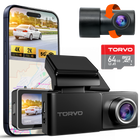
The TORVO TD3 Dash Cam includes built-in GPS and Wi-Fi alongside 4K video recording. The product page lists a 170-degree wide-angle view, 24-hour parking monitoring, and support for memory cards up to 256GB.
Explore the TORVO TD3 Dash Cam
This makes it relevant for drivers who want GPS information integrated with their dash cam recordings without necessarily moving into a cellular fleet-tracking system.
If your priority is recorded video plus GPS information, built-in GPS can be a practical feature to have.
If your priority is remote, real-time vehicle tracking, however, look specifically for cellular connectivity and a connected tracking service. Do not assume that a product with GPS automatically provides that functionality.
What Should You Look for in a GPS Dash Cam?
When shopping for a dash camera with GPS tracking capabilities, start with the feature you actually need.
If you are an everyday driver
Prioritize:
- Good front-camera image quality
- Strong nighttime performance
- Reliable recording
- GPS location and speed data
- Convenient video transfer
- Adequate storage
- Parking monitoring if required
If you frequently travel
GPS becomes more useful because it can help organize and contextualize longer trips.
Look for a system that provides easy access to route information and recorded GPS data.
If you manage vehicles
A fleet dash cam with GPS tracking needs a different checklist.
Look for:
- Cellular connectivity
- Live location tracking
- Cloud access
- Driver or vehicle history
- Event notifications
- Multiple camera support
- Fleet reporting
- Appropriate data plans
- Remote video access
In this case, you’re not simply buying a camera. You’re choosing part of a vehicle-monitoring system.
Frequently Asked Questions
Does a dash cam need GPS?
No. A dash cam can record video without GPS. GPS is an additional feature that can associate recordings with information such as location and speed.
What does GPS do on a dash cam?
GPS allows a compatible dash cam to determine and record location information. Many GPS dash cameras can also associate speed and time information with recorded footage.
Does GPS on a dash cam mean live tracking?
No. Built-in GPS and live tracking are different. Live tracking generally requires a cellular or internet connection and a compatible cloud service.
Can a dash cam track a car without internet?
A dash cam can record GPS information without an internet connection if it has its own GPS receiver. However, remote real-time tracking generally requires some form of connectivity to transmit the vehicle’s location.
Is a GPS dash cam worth it?
For many drivers, GPS is a useful additional feature because it can add location and speed information to recordings. Whether it is worth paying more for depends on how you use the camera and whether you need GPS logging or live tracking.
What is the difference between a GPS tracker dash cam and a normal dash cam?
A GPS tracker dash cam generally combines video recording with location information. Some connected models can also transmit that information remotely. A normal dash cam may focus primarily on recording video without GPS.
Can GPS improve dash cam footage?
GPS does not improve the actual image quality of the camera. Instead, it adds contextual information such as location and, on compatible systems, speed and route data.
Do GPS dash cams require a subscription?
Not necessarily. A dash cam can use GPS without a subscription. However, remote cloud features and cellular live tracking may require a paid service or data plan, depending on the product.
Is Wi-Fi the same as GPS tracking?
No. GPS determines location. Wi-Fi generally provides a local connection between the dash cam and a nearby phone or device. Remote tracking typically requires cellular or another internet connection.
Are GPS dash cams useful for fleets?
They can be. Fleet operators may benefit from combining vehicle video with location information. For larger operations, a dedicated connected fleet dash cam and tracking platform may provide more appropriate management features than a consumer camera.
Final Thoughts
A dash cam with GPS tracking can mean different things depending on the product.
At the simplest level, GPS adds location and potentially speed information to your recordings. That can make footage easier to understand and review.
A more advanced vehicle tracking camera can combine GPS with cellular connectivity, cloud services, remote viewing, and live location tracking. That is a different category of system, particularly useful for businesses and fleet operators.
Before buying, decide which capability you actually need:
GPS logging, or live remote tracking?
Once you know the answer, comparing dash cams becomes much easier. If your priority is a feature-rich camera with built-in GPS for everyday driving, the TORVO TD3 Dash Cam is one option to consider.
Comments (0)
Leave a reply