

Dash Cam vs Car Security Camera: What Protects a Parked Car?
You park on the street, go to bed, and wake up to a scraped bumper with no note on the windshield. That moment is why so many drivers start shopping for a security camera for car use. Then the search results split in two directions: dash cams on one side, "car security cameras" and cloud-connected car surveillance cameras on the other. They look alike, they overlap a lot, and the marketing rarely explains where one ends and the other begins.
This guide sorts that out. You'll see what each type is designed to do, how parking mode really works, why power is the part most buyers underestimate, and which setup makes sense for the way you actually park.
The Short Answer
For most drivers, a front and rear dash cam with a proper parking mode, powered through a hardwire kit, is the most practical way to protect a parked car. One device records the hit-and-run in the grocery store lot and the near miss on the highway.
A dedicated car security camera earns its place in a narrower set of situations: when you want an alert on your phone the moment something happens, when the car sits for days at a time, or when the real risk is someone getting into the cabin. Even then, most of those products are dash cams with extra connectivity, not a separate kind of hardware.
What a Dash Cam Is Actually Built to Do
A dash cam is a small camera mounted near the windshield that records while you drive. It saves video to a memory card in short clips and overwrites the oldest files when the card fills up, a process called loop recording. A built-in G-sensor (an accelerometer that measures sudden force) locks a clip when it detects a hard brake or collision, so that file isn't overwritten. Our beginner's guide on how dash cams work explains loop recording and event files in more detail.
The key point is that a dash cam's default job is driving. It switches on with the ignition and off when the car shuts down. Without parking mode and a constant power source, it sees nothing once you walk away.
What People Mean by a "Security Camera for Car"
"Security camera for car" isn't a formal product category, which is part of the confusion. When people use the phrase, they usually mean one of three setups:
- Cloud-connected dash cams. These add a 4G LTE connection or a link to a Wi-Fi hotspot so the camera can reach the internet while parked. Several brands run cloud services that push an impact notification to your phone and offer remote viewing, as this overview of dash cam cloud services describes. Features and pricing vary by brand, and many need a data plan.
- Cabin-facing cameras. Aimed inside the car, they capture anyone who opens a door or reaches through a broken window. Rideshare drivers often use them while driving, and some owners rely on them for break-in evidence.
- Home security cameras pointed at the car. If you park in a driveway, an outdoor camera on the house can work as a car surveillance camera without drawing a single watt from the vehicle.
Only the third option is truly separate from a dash cam. The first two are dash cam hardware with different priorities.
Dash Cam vs Car Security Camera at a Glance
| Feature | Dash Cam with Parking Mode | Cloud or LTE Car Security Camera | Home Camera Aimed at the Car |
|---|---|---|---|
| Records while driving | Yes | Yes, on most models | No |
| Records while parked | Yes, with a hardwire kit or battery pack | Yes, with a hardwire kit or battery pack | Yes, but only at home |
| Phone alerts while you're away | Usually no; you review clips later | Yes, with a data connection | Yes, over home Wi-Fi |
| Ongoing cost | None after purchase | Often a data plan or cloud subscription | Sometimes a cloud subscription |
| Draw on the car battery | Yes, limited by a low-voltage cutoff | Yes, and the data link has to stay awake | None |
| Covers work, errands, and travel | Yes | Yes | No |
| Best for | Daily drivers with mixed parking | High-risk street parking, valuable vehicles | Driveway or carport parking |
Parking Mode: Where a Dash Cam Becomes a Car Surveillance Camera
Parking mode is a low-power state the camera enters after the ignition switches off. Instead of recording every second at full quality, it watches for triggers. Most cameras offer some mix of these:
- Impact detection. The G-sensor wakes the camera when the car is bumped, hit, or shaken.
- Motion detection. The camera records when something moves in the frame.
- Time-lapse. The camera records at a few frames per second, squeezing hours of parking into minutes of video.
- Low-bitrate recording. Continuous recording at reduced quality to save card space.
Each one trades coverage against power and storage. Impact-only uses the least energy, but it can miss someone who keys a door without rocking the car. Motion detection catches more, though on a busy street it may fire for every passing pedestrian and set of headlights. Time-lapse gives the fullest picture of a long night, yet a quick event can fall between frames.
Why Buffered Recording Matters
Some cameras keep a rolling few seconds of video in memory, so the saved clip starts before the trigger. Without that buffer, an impact-triggered file may begin a moment after the contact, showing a car pulling away but not the hit itself. When comparing models, look for "buffered" or "pre-event" parking recording on the spec sheet.
The Power Problem Nobody Mentions in the Ad
This is where most parked-car plans fall apart. A dash cam plugged into a 12V socket usually loses power when the car turns off, so parking mode never starts. The small internal battery or supercapacitor inside most dash cams exists to close the last file safely, not to run the camera for hours.
Nextbase states this plainly in its support article on dash cam battery drain: parking mode needs a permanent power supply, because the camera's internal battery will run down if it isn't fed while parked. There are three common ways to provide that power:
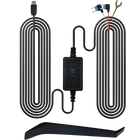
- Hardwire kit. Connects the camera to the car's fuse box. A good kit includes a low-voltage cutoff that shuts the camera off before the battery drops too far. Nextbase's Series 2 kit, for example, cuts power at 11.6 volts.
- OBD-II power cable. Plugs into the diagnostic port under the dash. It's quicker to install, but confirm that your vehicle keeps that port powered after shutdown.
- Dedicated dash cam battery pack. A separate battery charges while you drive and runs the camera while parked, leaving the car's starter battery alone.
A cutoff protects the starter battery, but it also sets how long you're covered. An aging battery, cold weather, short trips, or a car that sits all week all mean the camera shuts down sooner. Nextbase also points out that a car left unused long enough can still go flat from its own background draw after the camera has cut out. If you only drive on weekends, a battery pack or a home camera may suit you better than a hardwire kit alone. For the wiring itself, our step-by-step dash cam installation guide covers cable routing and fuse taps.

What a Camera Can and Can't Do for a Parked Car
The national picture is improving. According to the National Insurance Crime Bureau's 2025 vehicle theft analysis, 659,880 vehicles were reported stolen in the US in 2025, a 23% drop from 2024 and the lowest level in several decades. Even so, NICB notes that a vehicle is still stolen every 48 seconds, and more than a third of thefts happen in the ten metro areas with the highest volume.
A camera rarely stops a determined thief. What it does well is produce evidence: the plate of the driver who clipped your mirror, the face of someone checking door handles, and the timestamp an insurer or police officer will ask for. A visible camera may also nudge an opportunist toward a different car, although that effect is hard to measure.
That's why a camera works best as one layer of protection. NICB's own prevention list starts with the basics: park in well-lit areas, roll up the windows, lock the doors, take your keys, and consider anti-theft tools such as steering wheel locks, alarms, kill switches, or GPS trackers. The camera records what happens. Those habits make it less likely to happen at all.
Which Setup Fits the Way You Park?
| Where You Usually Park | Main Risk | Setup That Makes Sense |
|---|---|---|
| Street parking in a busy city | Hit-and-runs, sideswipes, vandalism | Front and rear dash cam, hardwired, with impact plus motion or time-lapse parking mode |
| Private driveway or carport | Break-ins and theft | Outdoor home camera covering the car, plus a dash cam for the road |
| Office or apartment garage | Door dings and scrapes | Dash cam with impact-triggered parking mode |
| Airport or long-term lot | Several days without driving | Battery pack or cloud camera, since a hardwire cutoff may end coverage early |
| Rideshare or delivery work | Passenger disputes, cabin incidents | Dash cam with a cabin-facing camera, audio set to match local consent rules |
Where the TORVO TD3 Fits
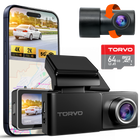
For drivers who want parked-car evidence without a subscription, the TORVO TD3 4K Dashcam follows the dash cam approach described above. According to Torvo's product page, it records 4K from the front camera and 2K from the rear, with a 170-degree front field of view, starlight night vision, built-in GPS, and a G-sensor that locks impact footage.
Its parking monitoring uses motion and collision detection, with low-bitrate and time-lapse options to stretch storage. One requirement matters more than any spec: parking mode only runs when the camera is powered through a hardwire setup such as the TORVO Dash Cam Hardwire Kit. Torvo's FAQ says the compatible kit provides continuous power with low-voltage protection.
It's worth being clear about the limits, too. The TD3 connects to your phone over its own built-in Wi-Fi, which is ideal for viewing and downloading clips when you're near the car. Torvo's product page doesn't list LTE or cloud alerts, so if instant notifications from across town are a must, pair it with a connected camera or choose one instead. Placement also affects what parking mode can see, so check our guide on where to mount a dash cam for the best view before you stick the mount down.
Legal Basics Before You Leave a Camera Running
Dash cams are generally legal across the US, but placement and audio are where owners tend to run into trouble.
- Windshield placement. Many states restrict objects that block the driver's view through the windshield, and some limit or ban windshield mounts entirely. A compact camera tucked behind the rearview mirror is usually the safest choice, but check your own state's vehicle code.
- Audio recording. Recording a public street is one thing; recording conversations is another. Some states require every party to consent before a conversation is recorded, and Justia's 50-state survey of recording laws is a useful starting point. If you're unsure, switch the microphone off, especially on a cabin-facing camera.
- Outside the US. Rules on mounting, audio, and sharing footage differ by country, so check local regulations.
None of this is legal advice. When in doubt, ask your local DMV or a qualified attorney.
Frequently Asked Questions
Does a dash cam record when the car is off?
Only if it has parking mode and a constant power source, such as a hardwire kit, an OBD-II cable, or a battery pack. Plugged into a standard 12V socket, most dash cams stop when the ignition does.
Will parking mode drain my car battery?
It does draw power, but a hardwire kit with a low-voltage cutoff shuts the camera off before the battery gets too low to start the car. How long you stay covered depends on your battery's age and condition, the weather, and the parking mode you choose.
Is a car surveillance camera better than a dash cam?
Not automatically. A cloud-connected camera adds remote alerts, which is valuable for high-risk street parking. A standard dash cam with parking mode records the same incidents without a data plan; you just review the footage afterward.
Do I need front and rear cameras for parking protection?
It helps a lot. A parked car can be hit from any side, and a front-only camera sees just one of them. A rear camera covers the bumper that reversing drivers tend to find.
Can a home security camera double as a car camera?
Yes, if the car sits within its view and Wi-Fi range. It won't help at work or on the road, though, so most people pair it with a dash cam.
How long does parking footage stay on the memory card?
It depends on card size, resolution, and parking mode. Time-lapse and low-bitrate modes use far less space than full-quality recording. Loop recording eventually overwrites unlocked clips, so save anything important soon after it happens.
Final Thoughts
A parked car needs two things from a camera: power to stay awake and a trigger smart enough to record what matters. A front and rear dash cam on a hardwire kit delivers both for most drivers, and it keeps working once you're back on the road. Add a cloud-connected camera if you need instant alerts, or a home camera if the car spends days in the driveway.
Start with where your car spends its nights. Pick the setup that covers that spot, then back it up with the simple habits that send thieves looking elsewhere.

Comments (0)
Leave a reply