

Dash Cam Specs That Matter and Specs That Don't
Pick up any dash cam box and you'll find a wall of numbers: 4K, 170 degrees, 3.2-inch screen, night vision, 5G Wi-Fi, 24-hour parking mode. Some of those numbers decide whether your footage will hold up after a collision. Others are there mostly because they look good on a box.
The trouble is that the box rarely tells you which is which. Two cameras can both say "4K" and produce very different video. A camera with a smaller screen can be the better buy. And the spec that most often kills a dash cam, heat, usually isn't printed anywhere obvious.
This guide sorts the dash cam features to look for from the ones you can safely ignore. It's written for first-time buyers and for anyone replacing an older camera, and it focuses on one practical question: when something happens on the road, will this camera give you clear, usable evidence?
The Short Version
If you only have a minute, this table covers what to look for in a dash cam and where the marketing tends to overreach.
| Spec | What the Listing Says | What Actually Matters | Priority |
|---|---|---|---|
| Image sensor | "Starlight" or "night vision" | A named, low-light sensor and real night sample footage | High |
| Bitrate | Usually not listed | Enough data per second to keep plates and signs sharp | High |
| Heat tolerance | Rarely listed | Operating temperature range and power design | High |
| Memory card | "Supports up to 256GB" | Card speed class and endurance rating | High |
| Coverage | "Front and rear" | Rear camera resolution and cable length for your vehicle | High |
| Parking mode | "24/7 monitoring" | Hardwire kit with low-voltage cutoff | Medium to high |
| G-sensor | "Impact detection" | Adjustable sensitivity so files lock without false alarms | Medium |
| Resolution | "4K Ultra HD" | Useful only when bitrate and sensor keep up | Medium |
| Field of view | "170° ultra wide" | Balance between width and detail | Medium |
| GPS and Wi-Fi | "Built-in GPS, 5G Wi-Fi" | Speed and location data, easy clip transfer | Depends on use |
| Screen size | "3.2-inch IPS display" | Enough to aim the camera and review a clip | Low |
Dash Cam Features That Actually Matter
The Image Sensor, Not the Pixel Count
The sensor is the part that turns light into an image, and it does more to shape your footage than the resolution number does. A good sensor keeps noise low at night, holds detail in shadows, and copes with headlights and bright sky in the same frame.
Many well-regarded dash cams use Sony sensors from the STARVIS family. Sony describes these as back-illuminated sensors built for security camera image sensor applications, where low light and harsh contrast are everyday problems. Dash cams face the same conditions: tunnels, streetlights, oncoming high beams, and a sunset straight through the windshield.
What to check:
- Whether the maker names the sensor model, or at least the sensor family.
- Whether it supports WDR or HDR (wide or high dynamic range), which helps when one part of the scene is much brighter than another.
- Real, unedited night footage from owners or reviewers, not just polished promo clips.
If a listing says "night vision" but gives no sensor detail and no raw sample video, treat the claim as unproven rather than false.
Bitrate, the Number Most Boxes Leave Out
Bitrate is how much data the camera writes for each second of video, usually measured in megabits per second (Mbps). Higher resolution only helps if there's enough bitrate to store the extra detail. When bitrate is too low, the encoder compresses hard, and fine detail like the characters on a license plate is the first thing to blur.
This is why two "4K" cameras can look so different. One may record a rich, detailed file. The other may record 4K-sized frames that look like upscaled 1080p once anything moves.
You can estimate bitrate yourself even if it isn't advertised. Take a one-minute clip, check its file size, and do a quick calculation:
Bitrate (Mbps) = (File size (MB) × 8) ÷ 60
A 150MB one-minute clip works out to about 20Mbps. That number on its own doesn't make a camera good or bad, but it's a useful way to compare two cameras at the same resolution.
Heat Tolerance and Power Design
A dash cam lives in one of the harshest spots in a car: pressed against the windshield, often in direct sun, sometimes for hours while parked. The National Weather Service notes that a car's interior can reach 100°F in about 25 minutes when it's only 73°F outside, and it keeps climbing from there.
That heat matters for two reasons. It stresses electronics and memory cards, and it affects whatever stores backup power inside the camera. Dash cams generally use either a small lithium-ion battery or a supercapacitor to save the last file when power cuts out. Supercapacitors are widely preferred in hot climates because they tolerate heat better, while internal batteries can degrade faster when they're repeatedly baked.
What to check:
- The rated operating and storage temperature range.
- Whether the camera uses a supercapacitor or a battery, and if it's a battery, its heat rating.
- Whether owners in hot regions report shutdowns, swelling, or card failures.
Some heat stress is unavoidable for any windshield device. A sunshade, sensible mounting, and a quality memory card all reduce it.
Memory Card Support, and the Card Itself
A dash cam is only as reliable as the card it writes to. It records constantly, overwrites old files, and repeats that cycle every drive. Cheap or slow cards are one of the most common reasons footage goes missing.
Two things matter here. The first is speed. The SD Association's Video Speed Class ratings (V10, V30 and so on) indicate a card's guaranteed minimum sustained write speed, which is what prevents dropped frames during recording. For 4K recording, a U3 or V30 card is the usual baseline. The second is endurance: "high endurance" cards are built for the constant rewriting that dash cams and security cameras do.
Capacity is the third factor. At around 20Mbps, one hour of video from a single camera takes roughly 9GB. A front and rear setup roughly doubles that load, so a larger card means more history before loop recording starts overwriting older clips.
Front and Rear Coverage
A front-only camera can't see what happens behind you. As Consumer NZ's dashcam buying guide points out, a forward-facing camera records the road ahead and nothing behind the vehicle. That leaves out rear-end collisions, which are one of the most common crash types, and anyone who reverses into you in a parking lot.
When comparing dual-channel cameras, look past the front camera's headline resolution and check the rear camera's resolution too. Cable length matters as well. A cable that's long enough for a sedan may not reach the rear glass of a crew cab truck or a minivan.
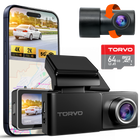
The TORVO TD3 4K Dashcam, for example, lists 4K front and 2K rear recording with both cameras running at the same time, which covers the two directions most incidents come from.
Parking Mode That Works the Way You'll Actually Use It
Parking mode lets the camera watch your car while the engine is off, recording when it detects motion or an impact. It's genuinely useful for hit-and-runs and break-ins, but the label alone tells you very little.
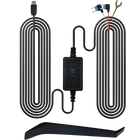
Most dash cams need a constant power source for real parking coverage, which usually means a hardwire kit connected to the fuse box. The important feature is low-voltage protection, which shuts the camera off before it drains your car battery. TORVO's TD3, for instance, supports parking monitoring only when paired with a compatible kit like the TORVO Dash Cam Hardwire Kit, which includes low-voltage protection.
Also check which parking modes the camera offers. Impact-triggered recording saves the most space, while time-lapse or low-bitrate modes give a fuller picture of what happened around the car.
A G-Sensor You Can Tune
The G-sensor detects sudden force and locks the current clip so loop recording won't overwrite it. Nearly every dash cam has one, so the useful question is whether you can adjust its sensitivity. Set too high, it locks clips every time you hit a pothole and fills the card with protected files. Set too low, it may miss a minor collision.
Specs That Matter Less Than the Marketing Suggests
Resolution Past a Certain Point
Resolution does matter, just not as much as the box suggests. Here's what the common labels mean in pixels:
| Label | Typical Pixels | Approx. Megapixels |
|---|---|---|
| 1080p (Full HD) | 1920 × 1080 | 2.1 MP |
| 1440p (often sold as 2K) | 2560 × 1440 | 3.7 MP |
| 4K (Ultra HD) | 3840 × 2160 | 8.3 MP |
More pixels give the camera more room to capture a distant plate or a street sign. But that only happens when the sensor gathers enough light and the bitrate preserves the detail. A well-tuned 2K camera can produce more readable footage than a poorly tuned 4K one, especially at night. Treat 4K as a meaningful upgrade when it comes with a good sensor and a healthy bitrate, not as a guarantee on its own.
An Ultra-Wide Field of View
A wider lens captures more lanes and more of the curb, which is useful. The catch is that everything in the frame gets smaller, and the edges of the image start to bend. A 170° lens sees more of an intersection, while a slightly narrower lens can make a plate a few car lengths ahead easier to read.
Neither is wrong. Wide angles suit city driving and side-impact situations. If you mostly drive on highways and care about reading plates ahead of you, resolution and bitrate matter more than squeezing in extra degrees.
Screen Size
A screen helps you aim the camera during setup and check a clip at the roadside. Beyond that, it rarely matters. You won't watch it while driving, and most people review and save footage on a phone or computer anyway. A larger, clearer screen is a convenience, not a quality signal.
"Night Vision" as a Label
There's no industry standard for "night vision," "starlight," or "super night mode." These terms can describe a genuinely capable low-light sensor, or simply a brighter exposure setting that adds noise. The label can be accurate, but it isn't proof. Sample footage and the sensor details are what tell you how a camera really performs after dark.
Extras You Might Never Use
Voice control, lane-departure alerts, and driver-assist warnings can be handy. They can also be distracting, and some drivers switch them off after the first week. Judge a camera on its core recording quality first, then treat extras as a bonus.
Features That Depend on How You Drive
Some dash cam features are essential for one driver and pointless for another.
- GPS: Adds speed, location, and route data to your footage. That can matter in an insurance dispute about how fast you were going, and it's especially useful for rideshare, delivery, and fleet drivers.
- Wi-Fi and a phone app: Lets you view and download clips without removing the memory card. Faster Wi-Fi (often listed as "5G Wi-Fi," usually meaning the 5GHz band) makes transferring large 4K files less tedious.
- Interior camera: Useful for rideshare drivers who want a record of passengers, but unnecessary for most private drivers. Recording inside a vehicle also raises privacy questions, so check local rules.
- Large card support: Matters most if you drive long distances or use parking mode heavily.
If you're new to how all these parts fit together, our guide on how dash cams work explains loop recording, file locking, and storage in plain terms.

A Simple Way to Compare Two Dash Cams
When you've narrowed it down to two or three options, run through these checks in order:
- Watch raw night footage from each camera, ideally from owners rather than the brand.
- Pause the footage and see whether you can read a plate one or two car lengths ahead.
- Check the operating temperature range and power design, especially if you live somewhere hot.
- Confirm the rear camera's resolution and whether the cable will reach in your vehicle.
- Find out exactly what parking mode requires, including any hardwire kit.
- Check the recommended memory card type and budget for a high endurance card.
- Only then compare extras like screen size, GPS, apps, and voice control.
Once you've chosen, placement matters almost as much as the camera itself. A great camera mounted too low or behind a tinted strip will underperform, so it's worth reading where to mount a dash cam for the best view before you peel off the adhesive.
Frequently Asked Questions
Is a 4K dash cam worth it?
It can be, if the camera pairs 4K with a good sensor and enough bitrate. In that case, you'll get more detail on distant plates and signs. A 4K label on a camera with a weak sensor or heavy compression may not look much better than a solid 2K camera.
Can a dash cam read license plates?
Often, but not always. Plate readability depends on distance, speed, lighting, glare, bitrate, and field of view. Most cameras do well on a plate directly ahead at a stop. Plates on fast-moving cars at night are much harder for any dash cam.
What memory card should I use in a dash cam?
Use the type and capacity the manufacturer recommends. For 4K recording, a U3 or V30 card is a sensible minimum, and a high endurance card is designed for the constant rewriting that dash cams do. Format the card in the camera periodically and replace it if errors start to appear.
Will parking mode drain my car battery?
It can if it's wired without protection. A hardwire kit with a low-voltage cutoff turns the camera off before the battery drops too far to start the car. Parking mode on an older or weaker battery deserves extra caution.
Is a supercapacitor better than a battery in a dash cam?
For hot climates, supercapacitors are generally considered more durable because they handle heat better than small lithium-ion batteries. Battery-based cameras can record briefly without external power, but that matters less if the camera is hardwired.
Do I need a front and rear dash cam?
If you want evidence of rear-end collisions or parking-lot bumps, yes. A front-only camera simply can't see behind the car.
Is it legal to use a dash cam?
In many places, recording the road from your own vehicle is legal, but rules vary. Some regions restrict where devices can be mounted on the windshield, and recording audio or passengers can fall under consent laws. Check your local regulations before installing.
Final Thoughts
The best dash cam features to look for are the ones that protect your footage when it counts: a capable sensor, enough bitrate, heat tolerance, a reliable memory card, coverage behind the car, and parking mode with proper power protection. Resolution, field of view, and screen size still matter, but they work best as tiebreakers rather than the main reason to buy.
If you're comparing options now, start with the checklist above and look closely at real footage. When you've made your choice, our step-by-step guide on how to install a dash cam will help you get it running properly from day one.

Comments (0)
Leave a reply