

Dash Cam Accessories Worth Buying
Most people spend an evening comparing dash cams, then spend about ninety seconds thinking about what goes around them. That's backwards. A 4K sensor is only as useful as the card it writes to, the dash cam mount holding it steady, and the cable keeping it powered. When a dash cam lets someone down at the worst possible moment, the camera itself is often not the part that failed.
This guide sorts dash cam accessories into three groups: the ones nearly every driver should buy, the ones that only make sense in certain situations, and the ones you can skip without missing anything. Most of the attention goes to the three that matter most, which are the memory card, the mount and the power cable (including hardwire kits).
The Short Answer: Which Dash Cam Accessories to Buy First
If you only read one part of this article, make it this table.
| Accessory | What it fixes | Who needs it | Verdict |
|---|---|---|---|
| High-endurance microSD card | Corrupted or missing clips caused by constant rewriting | Every dash cam owner | Buy |
| Hardwire kit with low-voltage cutoff | No recording while parked, dangling power cable | Anyone who wants parking mode | Buy if you park in public or on the street |
| Replacement dash cam cable | Short runs, worn connectors, random reboots | Owners of larger vehicles or damaged cables | Buy when needed |
| Spare adhesive pads or a better mount | Sagging, vibration, relocating the camera | Hot climates, anyone moving the camera | Cheap insurance |
| CPL filter | Dashboard reflections in daytime footage | Light-colored dashboards, sunny commutes | Situational |
| Cable clips and trim tool | Messy wiring across the headliner and pillars | DIY installers | Situational |
| Dedicated dash cam battery pack | Long parking coverage without draining the car battery | Rideshare drivers, long-term parking | Situational |
Dash Cam Memory Card: The Accessory That Decides Whether You Have Footage
If you buy only one accessory, buy a proper card. A dash cam records in short clips and overwrites the oldest ones when the card fills up. That loop runs every time you drive, and in parking mode it can run while you sleep. Few other consumer devices hammer a memory card this hard.
Why Regular Cards Fail in Dash Cams
Cards made for phones and cameras are built for occasional writes, not endless rewriting. Dash cam maker VIOFO tested cards returned by its customers and found the failures almost always traced back to cards not designed for continuous recording, including cheap consumer cards, photography cards and counterfeits. The warning signs it lists are worth knowing:
- Repeated "memory card error" messages
- Recording stopping or slowing on high-resolution settings
- The card showing as full even after formatting
- The camera freezing on the startup screen
- Clips that are missing or won't play
The frustrating part is that these problems often start small. You may not notice until you go looking for a clip that was never saved.
High Endurance and Speed Class: What the Labels Mean
Look for two things on the packaging. The first is the words "high endurance" or "max endurance", which signal flash memory rated for heavy rewriting. The second is the speed class symbol.
The SD Association explains that speed class symbols indicate a guaranteed minimum write speed, which is what matters for video, because a card that stalls mid-write drops footage. Its consumer FAQ lists U3 and V30 as the classes intended for Full HD to 4K recording. For a 4K front camera or a multi-channel setup, U3/V30 is the sensible floor. V60 and V90 cards cost more and are aimed at 8K and professional video, which most dash cams don't need. Endurance is the better place to spend your money.
What Size Card Do You Need?
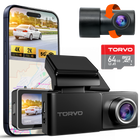
Start with your camera's maximum supported capacity and don't exceed it. The TORVO TD3 4K Dashcam, for example, ships with a 64GB card and supports cards up to 256GB, so anything larger simply won't work reliably in it.
Within that limit, a bigger card means more time before old clips are overwritten. That matters if you only find out about a scrape in the parking lot a few days later. As a rough rule of thumb:
| Setup | Practical card size |
|---|---|
| Single 1080p camera, commuting only | 32GB to 64GB |
| Front and rear cameras, 2K or 4K | 128GB |
| Three channels, or regular parking mode use | 128GB to 256GB (within your camera's limit) |
Your camera's resolution, bitrate and parking settings all change the real recording time, so check the manual or the storage screen in the app rather than relying on any single number.
Keep the Card Healthy
- Format it in the camera now and then. This clears accumulated file errors. Your manual will suggest an interval.
- Buy from authorized sellers. Counterfeit cards can report a fake capacity and fail without warning.
- Update firmware. VIOFO notes that firmware updates can improve compatibility with different card models, and other brands do the same.
- Replace it, don't nurse it. Cards wear out. Once errors start appearing, a new card is cheaper than lost evidence.
- Back up important clips the same day. A California injury attorney writing on dash cam evidence recommends copying footage off the card promptly after an incident, before the loop can overwrite anything.
Dash Cam Mount: Stability, Placement and Staying Legal
A wobbly mount turns sharp 4K footage into a smeared mess, especially over rough roads where license plates matter most. The mount that came in the box is usually fine. What's worth buying is a replacement adhesive pad or a sturdier mount if the original isn't holding up.
Adhesive vs. Suction vs. Mirror Mounts
| Mount type | Stability | Easy to move? | Watch out for |
|---|---|---|---|
| Adhesive (3M-style pad) | Best, with minimal vibration | No, needs a fresh pad each time | Clean, warm glass for a proper bond |
| Suction cup | Good with light cameras | Yes | Can lose grip in heat and cold, more wobble |
| Rearview mirror clamp or strap | Varies | Yes | Vibration, may interfere with mirror adjustment |
For most drivers, adhesive wins. It keeps the camera closer to the glass, which reduces reflections, and it doesn't slowly sag the way suction cups can. The TORVO TD3 uses a 3M adhesive mount for exactly this reason.
The trade-off is commitment. If you might move the camera to another car, or you're still deciding on placement, keep a couple of spare adhesive pads in the glovebox. Clean the glass with isopropyl alcohol before sticking anything, avoid installing on a freezing morning, and give the adhesive time to bond before you hang the camera's weight on it.
Where to Put It
The usual sweet spot is behind the rearview mirror, inside the area cleared by the wipers, with the lens level and not tilted too far toward the sky. We cover angles, rear camera placement and common mistakes in detail in our guide on where to mount a dash cam for the best view.
A Quick Word on the Law
Windshield rules vary by state and country, so check yours. California is a good example of how specific they can be. Under Vehicle Code section 26708, a dash cam may sit in a 7-inch square in the lower passenger-side corner, a 5-inch square in the lower driver-side corner, or a 5-inch square at the top center of the windshield. A suction mount stuck in the middle of the glass at eye level is the classic way to earn a ticket.
Dash Cam Cable: Powering the Camera Properly
Power problems are the second most common source of dash cam headaches after bad cards. Random reboots, a camera that won't start, or a recording that cuts out over bumps can often be traced to the cable, the plug or the socket.
The Stock 12V Adapter Is Fine for Driving
If you only want recording while the engine runs, the cigarette-lighter adapter in the box does the job. Nextbase's own support team says the 12V cable is sufficient for driving-only recording, while parking mode needs a permanent power supply.
Where a replacement dash cam cable earns its place:
- Length. SUVs, vans and pickup trucks often need a longer run to tuck the cable into the headliner and down the pillar. Rear camera cables in particular can come up short in larger vehicles.
- Connector type. Match the plug exactly (USB-C, mini USB or a proprietary connector). Close enough isn't good enough.
- Current rating. A random phone cable may not deliver steady power, especially in a multi-channel setup. Use the manufacturer's cable or one rated for your camera's draw.
- Wear. Cables that get pinched in trim panels or bent at the plug every day eventually fail. If the camera only works when you wiggle the cord, replace it.
Hardwire Kit: The Upgrade for Parking Mode
A hardwire kit connects your dash cam directly to the fuse box instead of the 12V socket. That does two things. It frees up the socket and hides the cable, and it keeps the camera powered after you switch off the engine, which is what makes parking mode possible.
The feature to insist on is a low-voltage cutoff. This monitors your car battery and shuts the camera off before the battery drops too low to start the car. Nextbase, for instance, designs its kit to cut power when the battery reaches 11.6V. Never hardwire a camera with a kit that doesn't have this protection.
Be realistic about what the cutoff can do, though. It protects the battery from the camera, not from age or long periods without driving. Nextbase points out that a car left unused for a long time can still go flat, with or without a dash cam. If your battery is already weak, parking mode will simply reach the cutoff sooner.
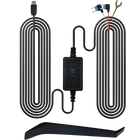
If you own a TORVO camera, the TORVO Dash Cam Hardwire Kit is designed for this job, and the TD3 requires a hardwire connection for its 24/7 parking monitoring. Check compatibility with your camera model before buying any kit. If fuse boxes make you nervous, a professional install is money well spent, and our step-by-step guide on how to install a dash cam shows what's involved.
Some brands also sell OBD power cables, which plug into the car's diagnostic port instead of the fuse box. They're easier to fit, but the port location and how much the cable sticks out vary by vehicle.
Situational Extras Worth Considering
CPL Filter
A circular polarizing (CPL) filter clips over the lens and cuts the reflection of your dashboard in the windshield, the pale ghost image that can wash out daytime footage. It's most useful if you have a light-colored dash or drive into the sun every morning. Rotate it after fitting while watching the live view to find the angle with the least glare.
There's a catch. Polarizers block some light, and BlackVue advises removing its CPL filter for nighttime recording. If most of your driving happens after dark, or a dark dashboard mat already kills the glare, you can skip it.
Cable Clips and a Trim Tool
A plastic trim tool and a handful of adhesive cable clips cost very little and make the difference between a tidy install and a cable dangling across the passenger's view. Check the box first: many cameras, including the TD3, already include a cable-install tool.
Dedicated Dash Cam Battery Pack
A battery pack powers the camera in parking mode from its own cells and recharges while you drive. It keeps the car's starter battery completely out of the equation, which appeals to rideshare drivers, people who park for long stretches, and owners of vehicles with small 12V batteries. They cost considerably more than a hardwire kit and are brand-specific, so only buy one if a hardwire kit genuinely isn't enough.
More Cameras, Not More Gadgets
If you drive for a rideshare service or regularly carry passengers, the most useful upgrade may be more coverage rather than another accessory. A three-channel camera such as the TORVO TD4 3 Channel Dash Cam adds a cabin view to front and rear recording.
Dash Cam Accessories You Can Skip
- Cheap, unbranded "high-speed" cards. Especially huge capacities at suspiciously low prices. Counterfeit risk is real.
- Hardwire kits without a low-voltage cutoff. Saving a few dollars isn't worth a dead battery.
- V60 or V90 cards for a standard dash cam. You're paying for speed the camera won't use.
- Generic suction mounts for heavy cameras. Expect vibration and the occasional drop.
- Daisy-chained socket splitters. Running a dash cam, phone charger and other gadgets from one overloaded socket invites unstable power.
A Simple Order of Priorities
- Swap in a high-endurance U3/V30 memory card sized within your camera's limit.
- Check the mount. Replace the pad or upgrade the mount if the camera sags or vibrates.
- Decide whether you need parking mode. If yes, get a compatible hardwire kit with a low-voltage cutoff.
- Tidy the dash cam cable with clips, or replace it if it's too short or worn.
- Add a CPL filter only if daytime glare is visibly hurting your footage.
If you're new to all of this, our beginner's guide on how dash cams work explains loop recording, G-sensors and parking mode in plain terms.
Frequently Asked Questions
Can I use the memory card from my phone in my dash cam?
It will usually work at first, but it's likely to fail early. Phone cards aren't built for nonstop rewriting. Use a card labeled high endurance and rated at least U3 or V30 for 4K recording.
What size memory card do I need for a dash cam?
For a front and rear camera, 128GB is a practical choice for most drivers. Never go above the maximum capacity your camera supports, and check the manual for the exact limit.
How often should I format my dash cam memory card?
Follow your camera's manual. Many drivers format monthly as a habit, always using the camera's own format function rather than a computer.
Is a suction or adhesive dash cam mount better?
Adhesive mounts are more stable and vibrate less. Suction mounts are easier to move between vehicles but can loosen with temperature changes.
Will a hardwire kit drain my car battery?
A kit with a low-voltage cutoff shuts the camera off before the battery drops too low to start the car. A weak battery or long periods without driving can still leave you with a flat battery, so the cutoff is a safeguard, not a guarantee.
Can I use any USB cable to power my dash cam?
Not reliably. Match the connector, use a cable long enough for a hidden route, and choose one rated for your camera's power draw. The manufacturer's cable is the safest option.
Do I need a CPL filter?
Only if you see dashboard reflections in your daytime footage. Remove it for night driving, since it reduces the light reaching the sensor.
Final Thoughts
The best dash cam accessories aren't flashy. A high-endurance memory card protects the footage itself, a solid dash cam mount keeps it sharp, and the right dash cam cable or hardwire kit keeps the camera running when you need it most. Get those three right before spending on anything else. For more practical setup advice, browse the TORVO Tips & Fix guides.

Comments (0)
Leave a reply