When Drivers Disagree About Fault
Footage may help clarify vehicle positions, movements, and events leading up to the collision.
A dash cam can capture important details before, during, and after a road accident. When filing an insurance claim, this footage may help you review what happened, document vehicle movements, and provide your insurer with a clearer account of the incident. Knowing how to save, organize, and share the right recordings can make the claims process easier and help support your report.

After an accident, it can be difficult to establish exactly what happened. Different accounts, missing details, or a lack of witnesses can make the situation more complicated. Dash cam footage can provide a recorded view of the incident, helping you review important details and share relevant information with your insurance company.
Footage may help clarify vehicle positions, movements, and events leading up to the collision.
A recording may capture details that drivers or witnesses missed, helping provide additional context.
A rear camera may record the approaching vehicle and impact, adding another perspective to your account.
Footage may capture traffic signals, vehicle movements, and lane positions if they are visible in the recording.
A recording may capture details such as the vehicle's appearance, direction of travel, or license plate, depending on visibility and camera angle.
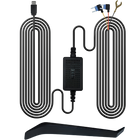
With Parking Mode properly configured and powered, your dash cam may record certain impacts or activity around your parked vehicle.
Timestamps and continuous recordings may help establish the sequence of events before, during, and after an incident.
Check the recording for important details, including vehicle movements, traffic conditions, and what happened before the impact.
Save the relevant clips immediately to prevent loop recording from overwriting them. Keep an original copy and create a backup.
Report the accident promptly. Let your insurance company know you have dash cam footage and ask how they prefer to receive it.
Prepare the relevant video clips along with accident photos, witness details, police report information, and your incident notes.
Send the requested footage and supporting documents. Your insurer will assess them alongside the other available evidence when reviewing your claim.
Every accident tells a different story. From rear-end collisions to parking lot damage, dash cam footage may capture important details that are difficult to remember or explain afterward. See how recorded footage can help document common driving incidents.
Another driver claims you stopped suddenly or reversed into their vehicle.
Your speed, position before impact, traffic conditions, and the other vehicle's approach.
Provides a visual timeline that can help clarify what happened before the collision.
Both drivers claim they had the right of way or a green light.
Traffic signals, vehicle movements, lane positions and the timing of entry, if visible.
May provide additional context to compare with driver statements, witness accounts and the police report.
The other driver leaves the scene before you can exchange information.
The other vehicle's color, type, direction of travel and possibly its license plate, depending on image quality and conditions.
May provide useful identifying details to share with the police and your insurance company.
Drivers disagree about who changed lanes, merged or caused the collision.
Lane positions, turn signals, vehicle movements and the sequence leading up to impact.
Gives insurers another account of the incident to consider alongside statements and other evidence.
You return to your vehicle and find damage, but no driver or note is present.
A nearby vehicle approaching, making contact or leaving the area, if parking mode was properly configured and captured the event.
May help identify the vehicle involved or establish when the damage occurred. Parking footage is not guaranteed unless the camera has suitable power and recording coverage.
Several vehicles are involved, and the order of impacts is unclear.
Vehicle positions, movements, and the timing of visible impacts from the camera's recorded view.
Can help establish a timeline of events and provide additional context when multiple accounts differ.
DASH CAM EVIDENCE FOR INSURANCE
Dash cam footage can provide a visual record of an accident and help support an insurance claim. It may show how vehicles moved, what happened before impact and the conditions on the road. However, footage is only one part of the evidence insurers consider when reviewing a claim.
Vehicle movements and positions
Traffic conditions at the time
Visible road signs and traffic signals
The sequence of events before impact
The timing of a collision
Weather and visibility conditions
Identifiable details of other vehicles
The complete circumstances of an accident
Actions that happened outside the camera's view
The legal determination of fault
Whether an insurance claim will be approved
Details hidden by darkness, glare, distance, or poor image quality
When choosing a dash cam for insurance documentation, look beyond front-camera resolution. Consider camera coverage, nighttime performance, reliable recording, and how easily you can access important footage. These features can help you capture and preserve useful details when an unexpected incident occurs.
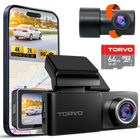
Captures activity in front of and behind your vehicle, including potential rear-end collisions.
All three models record front and rear.
Higher resolution can help capture visible details such as road signs, vehicle features, and license plates at suitable distances.
4K front and 2K rear recording on TD3, TD4 3-Channel and TD4 Mirror.
Low light, headlights, and glare can make important details harder to capture after dark.
TD3 features Starlight Night Vision and HDR; TD4 3-Channel features STARVIS night vision.
A wider field of view can capture more of the surrounding road and activity in adjacent lanes.
170° front-camera coverage on TD3 and TD4 3-Channel.
Provides continuous recording by replacing older footage when the memory card is full.
Loop recording on all three models. TD3 and TD4 3-Channel include a 64GB memory card and support up to 256GB.
Detects sudden impacts and helps protect important recordings from being overwritten.
G-Sensor protection is listed on TD3 and TD4 3-Channel.
Can capture certain impacts or activity while your vehicle is parked, depending on the camera's setup and recording conditions.
Available on all three models with a compatible hardwire kit or supported power setup.
Makes it easier to review, download, and preserve footage before it is overwritten or the memory card is reused.
Wi-Fi and app access on TD3 (5GHz) and TD4 3-Channel; built-in GPS on all three models.
You cannot control what happens on the road, but you can be better prepared to document it. Explore TORVO dash cameras and choose a recording setup that helps capture important details on every journey.
EXPLORE TORVO DASH CAMERAS
Looks like you haven't added anything to your cart yet. Explore our high-performance 4K dash cams and smart automotive gear!
Explore Products