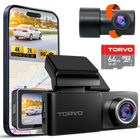
4K Resolution
3840 × 2160 pxRecords at 3840 × 2160 pixels, offering four times the pixels of 1080p. Ideal for drivers who want more detail in their footage.
Choosing a dash cam involves more than comparing video resolution. Learn which camera setup fits your driving needs, which features are worth considering, how parking mode works, and what to expect from the total setup cost. A practical guide to help first-time buyers make the right choice.


Resolution affects how much detail your dash cam captures. Higher resolutions can help you review road signs, vehicle details, and important moments more clearly. However, the camera sensor, lens, and lighting also influence video quality.
Records at 3840 × 2160 pixels, offering four times the pixels of 1080p. Ideal for drivers who want more detail in their footage.
Records at 2560 × 1440 pixels, delivering more detail than 1080p while using less storage than 4K at comparable settings.
Records at 1920 × 1080 pixels. Suitable for basic recording, but captures less detail than 2K or 4K.

Resolution affects how much detail your dash cam captures. Higher resolutions can help you review road signs, vehicle details, and important moments more clearly. However, the camera sensor, lens, and lighting also influence video quality.
Records at 3840 × 2160 pixels, offering four times the pixels of 1080p. Ideal for drivers who want more detail in their footage.
Records at 2560 × 1440 pixels, delivering more detail than 1080p while using less storage than 4K at comparable settings.
Records at 1920 × 1080 pixels. Suitable for basic recording, but captures less detail than 2K or 4K.
From bright daytime roads to dimly lit highways, the TORVO TD3 is designed to capture important driving details in different lighting conditions. Its Starlight Night Vision technology helps improve visibility in low-light environments, so you can review your footage beyond daylight hours.
A good dash cam should do more than record. Look for features that keep recording automatically, protect important clips, and make everyday use effortless.
Automatically records in short video segments and overwrites the oldest unprotected footage when the memory card fills up, so recording can continue without manual deletion.
Detects sudden impacts or sharp movements and locks the associated footage to help prevent important recordings from being overwritten.
Begins recording when your vehicle powers on the dash cam. No need to remember to start recording every time you drive.
GPS adds location and speed information to your recordings, while Wi-Fi lets you connect your dash cam to your smartphone. The screen makes it easier to view footage and adjust settings. Understanding these features helps you choose a dash cam that fits your needs.
| FEATURE | WHAT IT DOES | WHAT IT DOESN'T DO | ON TORVO MODELS |
|---|---|---|---|
| GPS | Records location, route, and speed information with your footage. | Track or locate your vehicle remotely. | Built into TD3, TD4 3-Channel, and TD4 Mirror. |
| Wi-Fi + App | Connects your phone to the camera to view, download, and manage recordings. | Provides remote live viewing or cloud access from anywhere. | Available on TD3 and TD4 3-Channel. |
| Built-in Screen | Lets you preview footage, check camera views, and adjust settings. | Improve the actual recording resolution or image quality. | 3.2-inch display on TD3 and TD4 3-Channel; 12-inch touchscreen on TD4 Mirror. |
Choosing the wrong dash cam can leave important gaps in your coverage or create problems when you need your footage. Avoid these common mistakes before making your purchase.
A 4K front camera is useful, but don't overlook rear or cabin coverage. Choose a setup that records every angle you need.
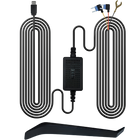
Many 12V sockets turn off with the ignition. Check whether your dash cam needs a compatible hardwire kit for parking mode.
Dash cams constantly rewrite footage. Use a compatible high-endurance memory card designed for continuous recording.
A poorly positioned camera can obstruct your view or miss important road details. Mount it securely without blocking your line of sight.
A dash cam is only useful if it records properly. Check your footage regularly to confirm the camera works and the lens is clean.
Recording laws vary by location. Before capturing cabin video or audio, understand your local privacy and consent requirements.
Every TORVO dash cam records front and rear, with GPS and parking mode support. Pick the one that matches your checklist.
Looks like you haven't added anything to your cart yet. Explore our high-performance 4K dash cams and smart automotive gear!
Explore Products