

How to Choose a Dash Cam for Your Car: A Buyer's Guide
A close call at an intersection, a sudden lane change, or a minor collision in a parking lot can leave you wishing you had a clear record of what happened. A car dash cam provides that record by capturing video while you drive, giving you footage you can review when you need to understand an incident.
However, choosing the right dash camera for your car involves more than comparing resolution numbers or buying the model with the most features. You need to consider where you drive, whether you want to record behind your vehicle, how well the camera performs at night, and whether it can monitor your car while parked.
This guide explains what matters when buying a dash cam, which features deserve your attention, and how to choose a setup that fits your vehicle and budget.
What Should You Look for in a Car Dash Cam?
A good dash cam should record clear footage consistently, save important clips reliably, and be straightforward to use. Extra features are valuable when they solve a problem you actually have.
Before comparing individual models, focus on these essential considerations:
- Video quality: Can the camera capture useful details, including road signs and vehicle license plates?
- Camera coverage: Does it record the road ahead, behind the vehicle, or inside the cabin?
- Night performance: Can it produce usable footage in low-light conditions?
- Parking mode: Can it monitor your vehicle when the engine is off?
- Storage: Does it support a suitable memory card for continuous recording?
- Ease of use: Can you install it safely, retrieve footage, and adjust settings without unnecessary hassle?
The right combination depends on your driving habits. A commuter who mainly drives during daylight may need a simpler setup than someone who drives at night, parks on busy streets, or uses a vehicle for rideshare work.
Choose the Right Video Resolution
Resolution determines how much detail a camera can capture, although the sensor, lens, image processing, lighting, and recording settings also affect the final result.
Consumer Reports discusses the differences between 1080p, 2K, and 4K dash cams in its buying guide. Higher resolution can help reveal details, but it does not automatically guarantee better footage in every situation.
Here is how the common options compare.
| Resolution | Main advantages | Best suited for |
|---|---|---|
| 1080p Full HD | Generally affordable and adequate for basic recording | Budget-conscious drivers |
| 2K or QHD | More image detail than standard 1080p, depending on the camera | Drivers seeking a balance between detail and cost |
| 4K UHD | Greater potential for capturing fine details in front-facing footage | Drivers who prioritize image detail |
Is a 4K dash cam worth it?
A 4K dash cam is worth considering if you frequently drive on highways, encounter dense traffic, or want greater image detail when reviewing incidents.
However, resolution is only part of the decision. A poorly exposed 4K recording may be less useful than a well-exposed lower-resolution recording. License plates can also become difficult to read because of motion, glare, distance, or darkness.
When possible, review actual daytime and nighttime sample footage before buying. Pay attention to moving vehicles, oncoming headlights, and details captured at a realistic distance.
Decide Between Front-Only, Dual-Channel, and Three-Channel Dash Cameras
The number of cameras determines which areas of your vehicle's surroundings are recorded. This decision can matter as much as resolution.
| Camera setup | What it records | Best for |
|---|---|---|
| Front-only | Road ahead | Drivers who want basic, affordable coverage |
| Front and rear | Road ahead and traffic behind | Everyday drivers who want broader coverage |
| Three-channel | Front, rear, and cabin | Rideshare drivers and people who need interior recording |
Front-only dash cams
A front-facing dash camera is a reasonable starting point if you mainly want to record traffic ahead of you. It is typically simpler to install and may cost less than a multi-camera system.
Its limitation is straightforward: it cannot directly capture what happens behind the vehicle unless that event is visible in its front-facing view.
Front and rear dash cams
A front and rear dash cam records both directions of travel. This can be useful when another vehicle hits you from behind, follows too closely, or becomes involved in an incident that occurs outside the front camera's view.
Check the resolution of both cameras rather than focusing only on the front camera's headline specification. Rear-camera image quality can differ significantly between models.
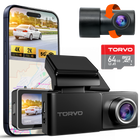
For drivers considering a dual-channel system, the TORVO TD3 4K Dashcam is one option to evaluate. Its product page lists 4K front recording, 2K rear recording, and an included 64GB memory card, with support for cards up to 256GB.
Three-channel dash cams
Three-channel systems add an interior-facing camera to the front and rear cameras. They are particularly useful for rideshare drivers who want to record activity inside the cabin as well as events on the road.
Before choosing one, check the interior camera's field of view, low-light performance, and whether infrared illumination is available if you need to record the cabin after dark.
Prioritize Night Vision and Real-World Video Quality
A dash cam may look impressive in bright daylight but struggle when the road is poorly lit. If you regularly commute before sunrise, drive after sunset, or travel on roads with limited street lighting, low-light performance deserves serious consideration.
Look for cameras that offer features such as:
- A light-sensitive image sensor.
- Wide dynamic range (WDR) or high dynamic range (HDR) processing to balance bright and dark areas.
- Exposure control that helps manage headlights and changing lighting conditions.
- Clear footage during movement, rather than only when the vehicle is stationary.
These features can improve recording quality, but their effectiveness varies by model. Marketing terms such as "night vision" do not guarantee that license plates will always be readable in darkness.
Whenever possible, look for unedited sample clips recorded on actual roads. Check whether headlights overwhelm the image, whether road markings remain visible, and whether moving vehicles retain useful detail.
If nighttime driving is a priority, explore the TORVO guide to dash cams with night vision for additional buying considerations.
Consider Parking Mode if You Leave Your Car Unattended
A dash cam normally records while the vehicle is running. Parking mode allows a compatible camera to monitor the vehicle after the engine is switched off, provided it receives power.
This feature can be useful if you frequently park on busy streets, in shared parking lots, or in places where minor collisions and vehicle damage are concerns.
Common parking-mode approaches include:
- Impact detection: Saves footage when the camera detects a bump or collision.
- Motion detection: Records when movement is detected within the camera's view.
- Time-lapse recording: Captures frames at intervals to create a condensed recording of the parking period.
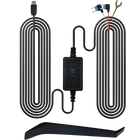
Not every camera supports every mode. Some require a compatible hardwire kit or separate power accessory to remain operational after the ignition is turned off.
Will parking mode drain your car battery?
It can draw power from your vehicle's electrical system. A suitable hardwire kit with low-voltage protection can help stop recording before the vehicle battery drops below a configured threshold.
Check the camera's power requirements and your vehicle's compatibility before installation. If you leave your car parked for long periods, consider how much recording time you genuinely need.
The TORVO parking-mode guide explains how the feature works and what to consider when setting it up.
Check GPS, Wi-Fi, and Other Useful Features
Extra features can make a dash camera more convenient, but not every driver needs all of them.
GPS tracking
Built-in GPS can associate recordings with location and, depending on the camera, speed information. This can provide useful context when reviewing footage.
However, GPS recording is not the same as live vehicle tracking. A camera with GPS alone does not necessarily let you locate your vehicle remotely.
Wi-Fi and mobile app access
Wi-Fi allows compatible cameras to connect to a smartphone so you can view recordings, adjust settings, and transfer clips without removing the memory card.
Check how the companion app works, whether it supports your phone, and whether transferring large video files is straightforward. Wi-Fi access also does not automatically mean the camera supports cloud storage or remote monitoring over the internet.
G-sensor and loop recording
A G-sensor detects sudden changes in motion, such as a collision, and can trigger the camera to protect relevant footage. Loop recording continuously replaces older, unprotected files when storage fills up.
Together, these features help a dash cam keep recording without requiring you to manage every file manually. Still, protected clips can consume storage over time, so review and back up important footage regularly.
Choose the Right Memory Card and Storage Capacity
Storage affects how much footage your dash cam can retain before older recordings are overwritten.
A larger card generally allows more recording time, but actual capacity requirements depend on resolution, bitrate, frame rate, the number of active cameras, and recording settings.
When selecting a memory card:
- Confirm the maximum capacity supported by the camera.
- Choose a card that meets the manufacturer's speed requirements.
- Consider a high-endurance card designed for frequent rewriting.
- Format the card according to the manufacturer's instructions.
- Check recordings periodically to confirm that the camera is saving files correctly.
The SD Association's video recording speed-class guide explains why sustained write speed matters when recording video.
If you choose a front and rear dash camera, remember that two active video streams consume storage faster than one. Higher-resolution recording can also use more space.
Check Installation, Power, and Heat Resistance
A dash camera is only useful when it is positioned correctly and records reliably.
For most vehicles, a practical starting point is a high windshield position near the rearview mirror, provided the camera does not obstruct the driver's view or interfere with built-in vehicle sensors. Review local windshield obstruction rules before installation.
The power setup matters, too. Some cameras plug into a vehicle power socket, while others support USB power or hardwiring. A rear camera also requires a suitable cable route between the front and rear of the vehicle.
Keep cables clear of airbags, pedals, and steering components. If you are unfamiliar with your vehicle's electrical system, professional installation may be the safer option.
Heat resistance deserves attention, particularly if your vehicle spends long periods parked outdoors. Check the camera's specified operating temperature range and the manufacturer's guidance for hot-weather use. A camera's battery type, internal components, and power design can affect its suitability for demanding conditions.
For more detailed placement advice, read the TORVO guide to mounting a dash cam for the best view.
How Much Should You Spend on a Dash Cam?
The best dash cam is not necessarily the most expensive one. Instead, compare the features you will actually use against the total cost of ownership.
| Buyer priority | Features worth prioritizing |
|---|---|
| Basic everyday recording | Reliable recording, good daylight video, loop recording |
| Greater image detail | 2K or 4K resolution and good image processing |
| Broader road coverage | Front and rear cameras |
| Rideshare or cabin recording | Three-channel coverage and suitable interior night performance |
| Parking protection | Parking mode, compatible power accessories, battery protection |
| Easy footage sharing | Wi-Fi, a usable app, and convenient file transfer |
Also check whether the package includes a memory card, rear camera, mounting hardware, and required cables. Accessories sold separately can change the overall value of a seemingly inexpensive camera.
Compare warranty terms, return policies, product support, and compatibility before making your final decision.
What's a Good Dash Cam for Your Driving Needs?
If you are still wondering what's a good dash cam, start with the situations you want it to handle.
For a straightforward commute, a dependable front camera with clear video may be enough. If you regularly drive in heavy traffic, a front and rear system gives you broader coverage. For rideshare work, an interior-facing camera may be more useful than a higher-resolution front camera alone.
Drivers who want high-resolution front footage, rear coverage, GPS, and Wi-Fi can compare the TORVO TD3 4K Dashcam against other models with similar features and total package costs.
Before buying, review its full specifications, supported accessories, storage requirements, and parking-mode power setup. Consider real-world video samples and independent reviews alongside the manufacturer's claims.
The aim is not to buy the camera with the longest feature list. It is to choose one that captures the footage you need and is reliable enough to record consistently.
Frequently Asked Questions
What is the most important feature in a car dash cam?
Reliable video recording is the most important starting point. Resolution, night performance, camera coverage, and storage all affect how useful the footage will be when you need to review an incident.
Is a 4K dash camera better than a 1080p model?
A 4K camera can capture more image detail, but resolution alone does not determine recording quality. The lens, sensor, exposure, and lighting conditions also matter.
Should I buy a front and rear dash cam?
Choose a front and rear setup if you want to record traffic both ahead of and behind your vehicle. A front-only model may be sufficient if you mainly want basic forward-facing footage.
Do dash cameras record when the car is off?
Only if the camera has a suitable parking-recording feature and continues receiving power. Depending on the model, you may need a compatible hardwire kit or another approved power source.
Does a dash cam need GPS?
No. GPS is optional for most drivers. It can add location and sometimes speed information to recordings, but basic video recording does not necessarily require it.
How much memory does a dash cam need?
The right capacity depends on recording resolution, the number of cameras, video settings, and how much footage you want to retain. Always check the manufacturer's supported capacity and recommended card specifications.
Are dash cams legal?
Rules vary by jurisdiction. Windshield placement, obstruction of the driver's view, and recording audio or people inside a vehicle may be subject to different requirements. Check the laws that apply where you drive before installing or using a camera.
How often should I check my dash cam?
Check it periodically to make sure it powers on, records correctly, and saves footage. Review important clips promptly, back them up somewhere safe, and follow the manufacturer's guidance on memory-card maintenance.
Final Thoughts
Choosing the right car dash cam starts with understanding what you need to record. Prioritize dependable video quality, decide whether rear or cabin coverage matters, and evaluate night performance, storage, and parking-mode requirements before paying for extra features.
A well-matched camera should fit your vehicle, suit your driving routine, and make it easy to retrieve footage when necessary.
Compare the specifications and recording capabilities of the models on your shortlist, then choose the one that offers the right balance of coverage, reliability, and value for your needs.
Comments (0)
Leave a reply