

Best 4K Dash Cams with Front and Rear Recording
A dash cam can record a lot more than just a general view of the road. When an incident happens, small details can matter: a license plate, traffic signal, road marking, vehicle position, or the sequence of events immediately before a collision.
That is where a 4K dashcam becomes especially interesting. 4K Ultra HD provides substantially more image detail than 1080p, although resolution alone does not guarantee better footage. Lens quality, sensor performance, exposure, compression, lighting, and camera placement all affect what you can actually see.
A front and rear setup adds another layer of coverage. Instead of recording only what happens ahead, a dual-camera system can also document activity behind the vehicle.
If you are comparing a 4k dash cam front and rear system, this guide explains what the specifications really mean, which features deserve attention, and what to consider before buying.
What Is a 4K Dash Cam?
A 4K dash camera records video at approximately 3840 × 2160 pixels, commonly referred to as 4K Ultra HD. That is more than eight million pixels, compared with roughly two million pixels for 1920 × 1080 Full HD. Sony describes 4K UHD as 3840 × 2160 and notes that it provides roughly four times the resolution of 1080p.
In practical terms, the extra resolution gives you more image information to work with. This can be useful when reviewing a recording on a larger screen or examining details within a frame.
However, there is an important catch: more pixels do not automatically mean a better dash cam.
A well-designed 1080p camera can sometimes produce more useful footage in difficult conditions than a poorly implemented 4K camera. When comparing a dash cam with high resolution, look beyond the number printed on the box.
Pay attention to:
- Image sensor and lens quality
- Daytime clarity
- Nighttime performance
- Exposure and dynamic range
- Field of view
- Video compression
- Frame rate
- Stability and mounting
- Storage capacity
- Recording reliability
The best 4K dash camera is the one that combines high resolution with dependable recording and useful coverage.
Why Choose a 4K Dash Camera?
The main advantage of a dash camera 4K system is detail.
Imagine that a vehicle passes through your lane and you later need to examine the footage. Higher resolution gives you more pixels from which to inspect the scene. That does not guarantee that every license plate will always be readable, but it can give you more useful visual information when conditions are favorable.
4K can be particularly helpful for:
- Highway driving
- Road trips
- Busy intersections
- Reviewing incidents on a computer or large display
- Capturing road signs and markings
- Recording vehicles at moderate distances
There is also a practical reason to consider higher resolution if you plan to keep important clips. A 4K recording can preserve more visual detail than a comparable 1080p recording.
The tradeoff is storage. Higher-resolution video generally creates larger files, so your memory card and recording settings matter.
Is a 4K Dual Dash Cam Better Than a Front-Only Camera?
For many drivers, yes, but it depends on what you want to record.
A 4K front dash cam focuses on the road ahead. That can be perfectly adequate if your main priority is documenting forward-facing incidents.
A dual-camera system adds rear coverage, which can be valuable when another vehicle approaches from behind, during rear-end collisions, or when you want a more complete record of what happened around the vehicle.
The important detail is that dual-camera does not automatically mean both cameras record in 4K.
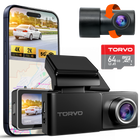
Some systems use a high-resolution front camera and a lower-resolution rear camera. For example, the TORVO TD3 is specified as a front 4K and rear 2K system. Its product page also lists a 64GB memory card and support for memory cards up to 256GB.
That is different from a system advertised as 4K on both front and rear channels.
4K front + 2K rear vs. 4K front + 4K rear
| Configuration | Front recording | Rear recording | Best for |
|---|---|---|---|
| Front-only 4K | 4K | None | Drivers primarily concerned with forward coverage |
| Dual 4K + 2K | 4K | 2K | Strong front detail with useful rear coverage |
| Dual 4K + 4K | 4K | 4K | Buyers prioritizing maximum resolution from both cameras |
| Front + 1080p rear | 4K | 1080p | Buyers wanting rear coverage at a lower storage cost |
There is no universal winner. A dual system with a lower-resolution rear camera may make more sense for someone who wants comprehensive coverage without the storage requirements of two 4K streams.
What to Look for in a 4K Dashcam
Resolution should be near the top of your checklist, but it should not be the entire checklist.
1. Front and rear coverage
If you want a complete record of a drive, look for a dual-camera setup.
Check the exact resolution of each camera, not just the headline resolution. A listing that says “4K dual dash cam” may use different resolutions for the front and rear channels.
The TORVO TD3, for instance, specifies 4K front and 2K rear recording rather than claiming 4K from both cameras.
2. Night recording
A camera that looks impressive during daylight can perform very differently after sunset.
Look for examples of actual nighttime footage and pay attention to whether headlights cause excessive glare, whether shadows become completely black, and whether important details remain visible.
Night performance depends on more than resolution. The sensor, lens, exposure settings, image processing, and surrounding light all contribute to the final result.
3. Wide field of view
A wider field of view can help capture more of the road and surrounding traffic.
But wider is not automatically better. Extremely wide lenses can introduce distortion toward the edges, and camera placement still matters.
TORVO's published information for the TD3 lists a 170-degree wide-angle lens.
For installation guidance, TORVO also recommends positioning the camera carefully so the lens captures the intended road area without interfering with sensors or the driver's view. Its guide on where to mount a dash cam for the best view explains the placement considerations in more detail.
4. GPS
Built-in GPS can add location and speed information to recordings.
This can make footage easier to contextualize because you can see where and, depending on the system, how fast the vehicle was traveling when the footage was recorded.
GPS is not a replacement for video quality, but it can be a useful supporting feature.
5. Wi-Fi connectivity
Wi-Fi can make managing recordings much easier.
Instead of removing the memory card every time you want to review footage, a Wi-Fi-enabled camera can allow you to connect a smartphone to the camera and access recordings through its companion app.
TORVO's own guide explains that Wi-Fi dash cams typically create a short-range connection between the camera and phone, allowing users to browse and save clips without an internet connection.
6. Parking mode
Parking mode is useful if you want your dash camera to monitor the vehicle after you turn off the engine.
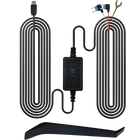
Depending on the camera, parking recording can be triggered by motion, an impact, or another monitoring method. Parking functionality often requires a dedicated power connection because the camera needs power while the vehicle is parked.
Garmin's support documentation, for example, explains that its parking modes can monitor a vehicle while parked and that compatible installations require an appropriate constant-power or parking-mode connection.
TORVO lists a 24-hour parking monitor among the TD3's features.
Before relying on parking mode, check the specific camera's installation requirements and the applicable rules where you drive.
7. Memory card capacity
4K video takes storage seriously.
If you record at higher resolution, the memory card can fill faster than it would with lower-resolution footage. Most dash cams use loop recording, which allows the camera to overwrite older, non-protected footage when storage becomes full.
Memory card quality matters as well. Garmin recommends using a high-quality authentic card with an appropriate speed rating for compatible dash cameras and notes that continuous recording can contribute to memory-card wear.
If you buy a 4K car dash camera, check the manufacturer's recommended card type and maximum capacity rather than choosing a card solely because it has a large number printed on it.
TORVO TD3: A 4K Front and 2K Rear Option
For buyers who want high-resolution front recording plus rear coverage, the TORVO TD3 4K Dashcam is one option worth considering.
According to TORVO's current product page, the TD3 records at 4K in front and 2K in the rear. It includes a 64GB memory card and supports storage up to 256GB. The page also lists a 3.2-inch IPS display, 170-degree wide-angle view, built-in Wi-Fi and GPS, and 24-hour parking monitoring.
That combination makes the TD3 particularly relevant for drivers who are searching for a 4K front dash cam but also want rear coverage.
It is worth emphasizing the specification accurately: this is a 4K front and 2K rear configuration, not a 4K rear camera.
That distinction matters when comparing products because the term "4K dual dash cam" can otherwise make two-camera systems sound more similar than they actually are.
How Much Storage Does a 4K Dash Cam Need?
There is no single storage capacity that works for every driver.
The amount of footage you can retain depends on several factors, including:
- Front and rear recording resolution
- Frame rate
- Video compression
- Recording length
- Whether parking mode is enabled
- How frequently protected incident files are created
- Memory card capacity
A higher-capacity card can reduce how frequently older recordings are overwritten, but it must be compatible with the camera.
For example, TORVO specifies support for up to 256GB on the TD3. The most sensible approach is to follow the manufacturer's stated memory-card specifications rather than assuming that the largest available card will work.
Does 4K Make a Dash Cam Better at Night?
Not necessarily.
This is one of the biggest misconceptions surrounding high-resolution cameras.
A 4K sensor can capture more pixels, but nighttime image quality depends heavily on the amount of available light and how the camera handles it. Headlights, streetlights, reflections, shadows, and motion can all affect the recording.
When comparing a dash cam with high resolution, look for actual daytime and nighttime samples if they are available.
Ask yourself:
- Are license plates reasonably visible?
- Are headlights badly blown out?
- Can you distinguish objects in darker areas?
- Does the image remain clear when the car is moving?
- Is there excessive noise or smearing?
A 4K label is useful, but real-world footage tells you much more.
Installation Matters More Than Many Buyers Expect
Even an excellent camera can produce disappointing footage if it is mounted incorrectly.
The front camera should have a clear view of the road without unnecessarily obstructing the driver's field of vision. Cables should also be routed carefully, particularly around areas containing airbags or other vehicle safety equipment.
NHTSA has noted that aftermarket devices mounted in or around vehicle windows can raise vehicle-safety and regulatory considerations, and state laws can impose additional requirements.
For practical installation guidance, you can also read TORVO's step-by-step guide to installing a dash cam, which covers placement, cable routing, and rear-camera installation considerations.
Before installing any camera, check your vehicle's owner's manual and local regulations.
4K Dash Cam Buying Checklist
If you're comparing several models, use this checklist instead of focusing only on the word "4K."
| Feature | What to check |
|---|---|
| Resolution | Confirm the actual resolution of each camera |
| Camera coverage | Front only or front and rear |
| Night performance | Look for real-world nighttime footage |
| Lens | Check field of view and image distortion |
| GPS | Useful for location and speed data |
| Wi-Fi | Makes clip access easier |
| Parking mode | Check how it is powered and triggered |
| Storage | Confirm supported card capacity and type |
| Loop recording | Check how normal footage is managed |
| Event protection | Look for automatic saving of important clips |
| Installation | Ensure placement does not interfere with visibility or vehicle systems |
| App | Check how easily footage can be reviewed and exported |
Who Should Buy a 4K Dual Dash Cam?
A dual dash cam 4K system, or a high-resolution front and rear system, makes sense for drivers who want more than basic forward-facing recording.
It can be especially useful for:
- Daily commuters
- Highway drivers
- Frequent road-trippers
- Rideshare and delivery drivers
- Drivers who regularly park in public areas
- Anyone who wants front and rear evidence of an incident
If you rarely drive and only want a basic record of what happens ahead, a simpler front-facing camera may be sufficient.
The right choice depends on how much coverage you need and how much storage, installation complexity, and cost you are comfortable with.
Frequently Asked Questions
Is a 4K dash cam worth it?
It can be, particularly if you value additional image detail and frequently drive in situations where being able to inspect recorded footage matters. Just remember that resolution is only one part of image quality.
Is 4K better than 1080p for a dash cam?
4K provides substantially more pixels than 1080p. Sony identifies 3840 × 2160 as 4K UHD and notes that it has roughly four times the resolution of 1920 × 1080. However, sensor quality, lens design, lighting, processing, and compression also affect the usefulness of dash cam footage.
Does a 4K dual dash cam record 4K from the rear camera?
Not always. Some systems combine a 4K front camera with a lower-resolution rear camera. Always check the individual front and rear specifications. The TORVO TD3, for example, is specified at 4K front and 2K rear.
Is a 4K front dash cam enough?
For drivers primarily concerned with what happens ahead of the vehicle, a 4K front camera can be enough. If you also want coverage behind the vehicle, choose a dual-camera system.
Does a 4K dash camera need a large memory card?
It may need more storage than a lower-resolution camera because higher-resolution recordings can consume storage more quickly. Check the manufacturer's supported capacity and recommended card specifications before purchasing.
Does parking mode work when the car is turned off?
Parking mode can allow a compatible dash cam to record while the vehicle is parked, but the camera needs an appropriate power source. Depending on the system, recording may be triggered by motion or an impact. Garmin's documentation provides examples of how parking recording depends on dedicated power accessories.
Where should a dash cam be mounted?
The camera should have a clear view of the road while minimizing obstruction to the driver's view. It should also be positioned carefully around vehicle sensors and safety equipment. Follow the camera manufacturer's installation guidance and your vehicle owner's manual.
Final Takeaway
The best 4K dashcam is not simply the one with the biggest resolution number on the product box.
Look at the entire recording system: front and rear resolution, nighttime performance, lens coverage, storage support, GPS, Wi-Fi, parking mode, installation, and recording reliability.
If you specifically want a high-resolution front camera with rear coverage, the TORVO TD3 is a useful example of how these specifications can be combined. Its published configuration is 4K front and 2K rear, with GPS, Wi-Fi, a 170-degree lens, parking monitoring, and support for up to 256GB of storage.
Most importantly, compare the actual specifications of each camera rather than relying on broad terms such as "4K dual dash cam" or "Ultra HD." That small step can make it much easier to choose a system that matches the way you actually drive.
Comments (0)
Leave a reply