

Why Do I Need a Rear Dash Cam
Most people buy a dash cam for the road ahead. That makes sense. It’s where your eyes are, and it’s where you picture trouble coming from. But a surprising amount of what goes wrong on the road arrives from behind: the driver who didn’t notice traffic had stopped, the SUV that backs into your bumper in a parking lot and drives off, the tailgater who later insists you slammed on your brakes for no reason.
A front camera can’t see any of that.
If you’ve been asking yourself, “do I need rear dash cam,” this guide walks through what rear footage actually protects you from, when a front-only setup is honestly enough, how a dash cam wireless rear camera compares with a wired one, and where to mount the rear unit so the footage is worth keeping.
The Short Answer
For most drivers, yes. A front camera records half the story, and the back of your car is one of the most likely places to get hit. If the reason you want a dash cam is to protect yourself after a collision or a dispute, leaving the rear uncovered leaves a big gap in that protection.
That doesn’t mean everyone needs one. There are situations where a single front camera is a reasonable choice, and we’ll cover those too.
Why the Back of Your Car Needs a Witness
Rear-end collisions are among the most common crashes
According to NHTSA vehicle safety research, rear-end crashes account for more than 29 percent of all crashes, and they often happen because the following driver fails to react, or reacts too late, to a stopped or slowing vehicle.
Think about where you are in that scenario. You’re the car sitting at the red light. Your front camera is pointed at an empty intersection. It will record the jolt and maybe the car you get pushed into, but it won’t show who hit you, how fast they were going, or whether they were looking down at a phone.
A rear camera fills in exactly that missing piece.
Fault isn’t always as automatic as people assume
There’s a common belief that the driver in back is always at fault in a rear-end crash. In practice, the following driver is usually presumed responsible, but fault can be shared, and shared fault can reduce what the other party recovers.
That’s where disputes start. The other driver might claim you cut in front of them and braked hard, that you rolled backward, or that your brake lights weren’t working. Without video, it becomes your word against theirs.
Front and rear footage together create a timeline. The front camera shows why you slowed down (a car ahead stopping, a pedestrian stepping out). The rear camera shows how much space the other driver had and what they did with it.
Hit-and-runs and parking lot damage
Drivers leaving the scene is not a rare edge case. The AAA Foundation for Traffic Safety reported that 15 percent of police-reported crashes in 2023 involved a driver who fled, the highest share in recent years.
Many of the most frustrating incidents happen when you’re not even in the car. Someone backs out of the space behind you, taps your bumper, and leaves. If your dash cam has a parking mode and a rear camera, there’s a real chance you’ll have a clip of the vehicle that did it.
A quick reality check, though: reading a license plate on video depends on light, distance, speed, and camera resolution. A plate two car lengths away in daylight is often readable. A plate on a moving car at night often isn’t. Rear footage still helps, because it can show the vehicle’s make, model, color, and direction of travel.
Tailgaters and aggressive drivers
Tailgating, flashing headlights, and road rage almost always come from behind. If a situation escalates, rear footage documents who was following too closely and for how long. It’s a lot easier to report a dangerous driver when you can show what happened rather than describe it.

Front-Only vs Front and Rear: What Each One Captures
| Situation | Front-only dash cam | Dash cam with rear camera |
|---|---|---|
| You’re rear-ended at a light | Records the jolt and the scene ahead, not the other car | Shows the approaching vehicle, its closing speed, and possibly its plate |
| A car cuts you off and brakes | Captured well | Captured well, plus the traffic behind you |
| Someone hits your parked car from behind | Usually missed | Can be captured if parking mode is active |
| Tailgating or road rage dispute | Not captured | Captured |
| Chain-reaction crash | Only the vehicle in front | The full sequence, front and back |
| Incident at an intersection ahead | Captured | Captured |
When a Front-Only Dash Cam May Be Enough
A rear camera isn’t mandatory for everyone. A front-only setup can make sense if:
- You drive rarely, mostly on quiet rural roads with little traffic.
- Budget is tight and you’d rather have one good camera than two mediocre ones.
- Your vehicle makes rear mounting impractical, such as some soft-top convertibles.
- Your car already has a built-in recording system that covers the rear.
For daily commuters, city drivers, rideshare and delivery drivers, and anyone who parks on the street or in busy lots, rear coverage usually pays for itself the first time something happens behind you.
Rear Dash Cam vs Rearview Camera System
A lot of drivers assume their backup camera already covers this. It doesn’t, and the difference matters.
Under a federal rule, new US vehicles under 10,000 pounds built on or after May 1, 2018 must have rear visibility technology that shows a 10-foot by 20-foot zone directly behind the vehicle. That system exists to help you reverse without hitting someone. It’s a live view, not a recorder.
| Feature | Factory backup camera | Rear dash cam |
|---|---|---|
| Main job | Help you reverse safely | Record what happens behind you |
| When it’s active | Mainly while in reverse | The whole drive, and while parked if parking mode is on |
| Saves video | Typically no | Yes, loop recording to a memory card |
| What it sees | The area just behind the bumper | Traffic and road behind you |
| Value as evidence | Little to none | Strong, especially with timestamps and GPS data |
So if you’re comparing a dash cam rear view camera with the rearview camera system your car came with, think of them as teammates rather than substitutes.
Dash Cam Wireless Rear Camera vs Wired: Which Makes Sense?
Once you’ve decided on rear coverage, the next question is how the rear camera connects. “Wireless” sounds like the easy answer, but it helps to know what the word actually means here.
With a wireless rear camera, the video signal travels to the main unit without a cable. The camera itself still needs power, usually tapped from a nearby source such as the reverse light circuit, the license plate light, or a separate power outlet. So a wireless setup rarely means zero wires. It means no long cable running the full length of the cabin.
| Factor | Wired rear camera | Wireless rear camera |
|---|---|---|
| Installation | Longer cable tucked along the headliner and trim | Shorter wiring, but still needs a power source at the rear |
| Signal reliability | Stable, since nothing travels over the air | Can be affected by distance, interference, and metal body panels |
| Video quality | Usually consistent | Varies by model; some trade resolution for a steady signal |
| Parking mode | Works whenever the main unit is powered | Depends on how the rear unit gets its power |
| Best fit | Cars, SUVs, and most daily drivers | Long vehicles such as trucks, vans, RVs, and trailers |
For a typical sedan or SUV, a wired rear camera is usually the simpler long-term choice. The cable run is short enough to hide in an afternoon, and there’s no signal to drop. Wireless earns its place on long vehicles, where routing a cable 20 or 30 feet is a real chore. Whichever you choose, check the rear camera’s resolution, its night performance, and exactly how it gets power before you buy.
Rear Dash Cam Placement: Getting Footage You Can Actually Use
A rear camera in the wrong spot can produce footage that’s mostly trunk lid, sky, or glare. These steps help avoid that.
- Mount it high and centered. The top center of the rear window gives the widest view of the lanes behind you and keeps the trunk or bed out of most of the frame.
- Work around the defroster lines. Don’t stick the adhesive pad directly on the heating elements. Position the camera so the lines sit above or below the center of the image rather than cutting through it. Keeping the lens close to the glass also makes the lines and reflections less visible.
- Test with your tint. Dark aftermarket tint cuts the light reaching the lens, which mostly shows up in night footage. Record a short drive after dark before committing to a spot.
- Check the live view before peeling the adhesive. Power the camera, look through the screen or app, and adjust until the horizon is level and the road fills most of the frame.
- Plan the cable for hatchbacks and SUVs. The wire has to flex every time the hatch opens. Route it through the existing rubber boot between the body and the hatch where possible, and leave enough slack.
- Account for pickup beds. On trucks, the bed blocks the lower part of the view, so mounting higher on the glass matters even more.

For the full walkthrough on routing cables and hiding wires, see our step-by-step dash cam installation guide. If you’re still working out the front camera, our guide on where to mount a dash cam for the best view covers that side.
What to Look for in a Dash Cam With Rear Coverage
Not every front and rear setup performs the same. A few features make a noticeable difference:
- Resolution on both channels. Rear cameras are often lower resolution than the front. Check both numbers, not just the headline one.
- Night performance. Many incidents happen after dark. Look at real sample footage, not just spec sheets.
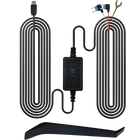
- Parking mode. This is what catches parking lot bumps. For it to work while the engine is off, the camera usually needs a hardwire kit with a low-voltage cutoff to protect your battery.
- Storage. Two cameras fill a memory card faster than one. A high-endurance card and a larger capacity give you more footage before loop recording overwrites older clips.
- GPS and Wi-Fi. GPS adds location and speed data to your clips. Wi-Fi lets you pull footage to your phone at the scene instead of removing the card.
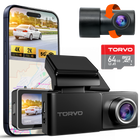
If you’re comparing options, the TORVO TD3 dash cam combines 4K recording with built-in GPS and Wi-Fi, a 170° wide-angle lens, a 3.2-inch IPS display, 24-hour parking monitoring, and support for memory cards up to 256GB. New to dash cams in general? Our beginner’s guide to how dash cams work explains loop recording, G-sensors, and parking mode in plain terms.
One more practical note: dash cams are generally legal in the US, but rules on windshield mounting and recording audio vary by state. It’s worth checking your state’s rules before installation, especially if your camera records sound inside the cabin.
Frequently Asked Questions
Do I need a rear dash cam if my car has a backup camera?
In most cases, yes. A backup camera shows a live view while you reverse and typically doesn’t save anything. A rear dash cam records the road behind you during the whole drive, and while parked if parking mode is on.
Is a wireless rear dash cam as good as a wired one?
It can be, but wired cameras are usually more consistent. Wireless models can be affected by distance and interference, and they still need a power source at the rear. They make the most sense on long vehicles where a cable run would be difficult.
Where is the best place to mount a rear dash cam?
The upper center of the rear window works for most vehicles. Avoid placing adhesive on defroster lines, keep the lens close to the glass, and check the live view before you commit.
Will a rear dash cam work through tinted windows?
Usually, yes, though darker tint reduces image quality at night. Test the camera after dark in your chosen spot before mounting it permanently.
Can a rear dash cam read license plates?
Sometimes. Plates are most readable in daylight, at short distances, and when the other vehicle is moving slowly. At night or at speed, footage is more likely to show the vehicle’s make, color, and movement than a clear plate.
Will a rear dash cam drain my car battery?
Not while you drive. In parking mode, the camera draws power while the car is off, which is why hardwire kits with a low-voltage cutoff are recommended. The cutoff shuts the camera down before the battery gets too low to start the car.
The Bottom Line
A front camera shows what you saw. A rear camera shows what happened to you. Since rear-end crashes, parking lot bumps, and tailgating disputes all start behind the car, rear coverage closes the biggest blind spot a front-only dash cam leaves.
If you drive regularly in traffic or park in busy areas, a dash cam with a rear camera is worth the extra cost and install time. Choose wired for most cars, wireless for long vehicles, mount it high and centered, and test the footage in daylight and at night before you call the job done.

Comments (0)
Leave a reply