

Best Budget Dash Cam That Doesn't Skimp on Quality
You do not need to spend hundreds of dollars to get a dash cam that can record useful footage. The challenge is knowing where to save money and where cutting costs can leave you with a camera that is frustrating to use when you actually need it.
The best budget dash cam is not simply the cheapest model you can find. A worthwhile affordable dash cam should capture clear video, record consistently, protect important footage, and offer practical features that make the camera useful after installation.
For many drivers, a budget of less than $200 is enough to find a capable dash cam with features such as high-resolution video, front and rear coverage, GPS, Wi-Fi, night recording, loop recording, and parking monitoring. The key is to prioritize the features that affect real-world performance instead of paying for specifications that look impressive on a product page but do little for everyday driving.
What Makes a Good Budget Dash Cam?
A cheap dash cam and a good budget dash cam are not necessarily the same thing.
The cheapest camera may record video, but that does not mean the footage will be clear enough to identify a license plate, recognize what happened during an incident, or remain available when you need it.
A better approach is to look for a combination of essential features:
| Feature | Why It Matters |
|---|---|
| High-resolution video | Makes important details easier to see |
| Front and rear recording | Provides coverage beyond the road directly ahead |
| Night recording | Helps capture incidents in low-light conditions |
| Loop recording | Allows the camera to keep recording as storage fills |
| G-sensor | Helps protect footage when a sudden impact is detected |
| GPS | Can add location information to recordings |
| Wi-Fi | Makes transferring footage more convenient |
| Parking monitoring | Can provide protection while the vehicle is parked |
| Reliable memory support | Reduces the chance of storage becoming the weak point |
You do not necessarily need every premium feature. What matters is getting the fundamentals right.
How Much Should You Spend on a Budget Dash Cam?
For shoppers searching for the best dash cam under $200, there is a useful middle ground between ultra-cheap cameras and premium systems.
Spending less than $200 can give you access to features that were once associated mainly with more expensive dash cams. However, price should be considered alongside resolution, camera coverage, storage compatibility, installation requirements, and recording reliability.
The important question is not:
"How cheap can I go?"
It is:
"What useful features can I get for my budget?"
For example, a camera that costs slightly more but includes front and rear recording, GPS, Wi-Fi, and parking monitoring may provide considerably more practical value than a basic front-only camera that saves you a few dollars.
That is why the best affordable dash cam is usually the one that balances the right features rather than simply offering the lowest purchase price.
Resolution Matters, But 4K Is Not Everything
Resolution is one of the first specifications shoppers notice. You will commonly see Full HD, 2K, and 4K dash cams on the market.
Higher resolution can provide more detail, which is particularly useful when reviewing signs, road markings, vehicles, and other objects in recorded footage. But resolution alone does not determine whether a dash cam produces useful video.
Lens quality, image processing, exposure, lighting conditions, camera positioning, and storage performance also affect the final recording.
A 4K camera can be an attractive choice for drivers who want more detail from the front camera. But you should also look at what the rear camera records if you are buying a dual-camera system.
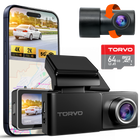
For example, the TORVO TD3 4K Dashcam combines 4K front recording with 2K rear recording. Its product page also lists a 64GB memory card and support for storage cards up to 256GB.
That type of front and rear setup can make more sense for everyday driving than spending the entire budget on front-camera resolution while ignoring coverage behind the vehicle.
Why Front and Rear Coverage Is Worth Considering
A front-only dash cam sees what happens ahead of your vehicle, but incidents can happen from other directions.
A rear camera adds another perspective. It can record approaching traffic, rear-end collisions, vehicles following too closely, and incidents occurring behind your vehicle.
This is particularly useful for drivers who spend a lot of time on highways or in busy city traffic.
If you are specifically searching for the best budget dash cam front and rear, compare the resolution of both cameras rather than looking only at the headline resolution of the front camera.
A specification such as "4K dash cam" tells you very little by itself. Ask:
- What resolution does the rear camera use?
- Are both cameras recording at the same time?
- Does recording quality change when both cameras are active?
- How much storage does the combined video require?
- Is the rear camera practical for your vehicle?
- How complicated is the installation?
A dual-camera system can be especially attractive when the additional coverage does not push the price beyond your budget.
Night Recording Is One of the Most Important Features
A dash cam that looks excellent in daylight can behave very differently after sunset.
Night driving introduces challenges such as headlights, reflections, dark roads, street lighting, and high contrast between bright and dark areas. This is why night recording should be part of your buying decision, even if most of your driving happens during the day.
Do not judge night performance solely by a marketing label such as "night vision." Look for sample footage from the camera whenever possible and pay attention to whether road details remain visible without excessive glare or noise.
The same principle applies to an affordable dashcam as it does to a premium model: real-world image quality matters more than a specification printed on the box.
Look for Loop Recording and G-Sensor Protection
Two features that can be easy to overlook are loop recording and G-sensor protection.
Loop recording
Dash cams generally record continuously in short video segments rather than creating one enormous file.
When the available storage becomes full, loop recording allows the camera to overwrite older, unprotected footage so recording can continue. This is one of the basic features that makes a dash cam practical for everyday use.
TORVO's own beginner's guide explains how dash cams use short clips and overwrite older footage when storage fills up. It also explains how a G-sensor can help protect footage after a sudden impact.
G-sensor
A G-sensor detects sudden changes in motion or force. When a sufficiently strong event occurs, the dash cam can mark or lock the associated footage so normal loop recording does not immediately overwrite it.
Sensitivity matters here. If it is set too high, ordinary potholes and speed bumps may trigger protected files. If it is too low, some smaller impacts may not be detected.
A medium setting is often a sensible starting point, followed by adjustment based on the roads you regularly drive.
GPS Can Add Useful Context to Your Footage
GPS is not essential for every driver, but it can be a useful feature in a budget dash cam.
A GPS-equipped camera can associate recordings with location information and, depending on the model and software, may display additional information such as the vehicle's route or position during playback.
This can make footage easier to understand when reviewing an incident.
It is worth remembering that GPS is different from an event data recorder built into a vehicle. NHTSA explains that vehicle event data recorders are designed to capture technical vehicle and occupant information around a crash, while they are not the same thing as devices that make an audio or video recording.
For a consumer dash cam, GPS is best viewed as an additional source of context, not as a replacement for other vehicle or crash data.
Wi-Fi Makes an Affordable Dash Cam Easier to Use
Wi-Fi is another feature that can make a surprisingly big difference.
Without Wi-Fi, you may need to remove the memory card and connect it to another device to retrieve footage. With built-in Wi-Fi, compatible cameras can make it easier to access recordings through a smartphone app.
The TORVO TD3 4K Dashcam includes built-in Wi-Fi and GPS, along with a 3.2-inch IPS display.
That combination is useful because you can have both an on-camera screen for basic interaction and wireless connectivity for handling recordings.
For drivers who do not want to constantly remove a memory card, Wi-Fi is a practical feature worth prioritizing.
Do You Need Parking Mode?
Parking mode can be valuable if you regularly leave your vehicle parked in public areas, apartment lots, shopping centers, or other busy locations.
Depending on the dash cam and its installation, parking monitoring may record when motion or an impact is detected while the vehicle is parked.
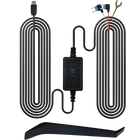
However, parking mode is not simply a software feature that works under every installation method. Many systems require a suitable hardwire connection or another continuous power source when the ignition is off. BlackboxMyCar's parking mode documentation, for example, explains that some systems require hardwiring or an OBD connection to remain powered after the vehicle is turned off.
This also means you should consider battery protection. A camera drawing power while your vehicle is parked needs an appropriate low-voltage cutoff or battery protection system to reduce the risk of excessive battery drain.
If you are considering parking monitoring, check the manufacturer's installation requirements before buying.
The TORVO TD3 lists a 24-hour parking monitor among its features.
Do Not Ignore the Memory Card
A good dash cam still needs reliable storage.
Video recording continuously writes data to the memory card, which means the card needs to sustain the required write speed. The SD Association explains that continuous video recording requires a minimum sustained write speed, which is why Speed Class ratings exist.
Dash cams also repeatedly overwrite older files. That makes endurance important, especially for cameras that are used frequently.
When choosing a memory card, check the dash cam manufacturer's recommended capacity and speed specifications instead of assuming that any microSD card will work.
The TORVO TD3 supports up to 256GB of storage and is listed with a 64GB card on its product page.
If you install a different card, make sure it meets the camera's requirements.
What About a Cheap Dash Cam With a Huge Field of View?
A wide-angle lens can help capture more of the surrounding road, but wider is not automatically better.
The TORVO TD3, for example, lists a 170-degree wide-angle view.
A wider field of view can provide more context around an incident, but extreme wide-angle lenses can also introduce more distortion toward the edges.
When comparing cameras, think about what you actually need to see. The goal is not simply to capture the largest possible area. It is to capture a useful view of the road with enough detail to understand what happened.
Installation Can Affect Performance
Even the best budget dash cam will perform poorly if it is installed incorrectly.
The camera should have a clear view of the road, remain within the area cleaned by your windshield wipers, and avoid obstructing the driver's view or interfering with factory-mounted sensors.
TORVO's dash cam installation guide recommends placing the camera high on the windshield, around the rearview mirror area, while keeping the lens inside the wiper sweep and away from vehicle sensor housings.
Windshield obstruction rules can also vary by location. For example, some state regulations restrict objects that interfere with the driver's clear view through the windshield. Virginia regulations specifically address windshield-mounted devices that obstruct the driver's vision.
Before installation, check your local requirements and your vehicle manufacturer's guidance.
A Practical Checklist for Choosing the Best Affordable Dash Cam
If you are comparing several models, use this checklist rather than focusing on price alone.
For the camera
- 2K or 4K front recording
- Useful rear-camera resolution if dual-channel recording is important
- Good low-light performance
- A practical field of view
- Reliable exposure in changing lighting
For recording
- Loop recording
- G-sensor or event protection
- Manual emergency recording
- Reliable memory card support
- Adequate storage capacity
For convenience
- Built-in Wi-Fi
- GPS
- A clear display, if desired
- Smartphone app support
- Simple controls
For parked vehicles
- Parking monitoring
- Appropriate hardwire or power options
- Battery protection or voltage cutoff
You do not need to check every box. The right combination depends on how and where you drive.
Is the TORVO TD3 a Good Budget Option?
For shoppers specifically looking for an affordable dash cam with substantial features, the TORVO TD3 is worth considering based on its published specifications.
The official product page lists:
- 4K front recording
- 2K rear recording
- 64GB memory card
- Support for up to 256GB
- Built-in Wi-Fi
- Built-in GPS
- 24-hour parking monitoring
- 3.2-inch IPS display
- 170-degree wide-angle view
- Day and night recording modes
The listed price was $109.99 when this article was researched, compared with a listed regular price of $129.99. Because product pricing and promotions can change, check the current TORVO TD3 4K Dashcam listing for the latest price and availability.
That feature set makes the TD3 an example of what shoppers can look for when they want a budget dash cam without reducing the camera to basic front-only recording.
Best Budget Dash Cam: What Should You Prioritize?
If you are trying to narrow down several affordable dash cams, prioritize them in roughly this order:
1. Recording quality
You need footage that is actually useful when something happens.
2. Reliable recording and storage
A camera that stops recording or corrupts files defeats the purpose of having one.
3. Front and rear coverage
If your budget allows it, dual-camera coverage can provide a more complete record of an incident.
4. Night performance
Important details should remain visible after dark.
5. Parking monitoring
Worth considering if your vehicle spends significant time unattended.
6. GPS and Wi-Fi
These features improve convenience and provide additional context.
7. Installation
A camera that is difficult to install correctly can become more trouble than it is worth.
This approach helps separate genuine value from a long list of specifications.

Frequently Asked Questions
Is a cheap dash cam worth buying?
Yes, provided you choose carefully. An inexpensive camera can still be useful if it offers dependable recording, sufficient video quality, loop recording, protected event files, and suitable storage support. The cheapest model is not necessarily the best value.
What is the best dash cam under $200?
There is no single model that is perfect for every driver. Under $200, focus on video quality, front and rear coverage, night performance, storage, GPS, Wi-Fi, and parking functionality. The TORVO TD3 is one example of a sub-$200 model with 4K front and 2K rear recording plus GPS, Wi-Fi, and parking monitoring.
Is 4K necessary for a dash cam?
No. A well-designed 2K or Full HD camera can still provide useful footage. However, 4K can provide additional detail, particularly from the front camera. Consider the complete imaging system rather than choosing based on resolution alone.
Is a front and rear dash cam better?
For many drivers, yes. A front and rear system records more of what happens around the vehicle. It is particularly useful when an incident occurs behind you rather than directly ahead.
Does a dash cam record when the car is off?
It can, but only if the camera continues receiving power. Parking mode commonly requires hardwiring, an OBD connection, or another suitable power source.
Can a dash cam drain the car battery?
A camera that remains powered while parked can consume battery power. Proper parking-mode installation should include appropriate battery protection or a voltage cutoff. If you only use a switched 12V outlet that turns off with the ignition, the camera generally will not continue drawing power after the vehicle is shut down.
How much storage does a dash cam need?
It depends on the camera's resolution, number of channels, recording settings, and how long you want footage retained. Higher-resolution and multi-camera systems generate more data. Always follow the camera manufacturer's recommended card specifications.
Where should I install a dash cam?
For most vehicles, a high windshield position around the rearview mirror provides a useful view while keeping the camera relatively unobtrusive. Make sure it does not block your view, interfere with vehicle sensors, or sit outside the windshield's cleaned area.
The Bottom Line
The best budget dash cam is not the camera with the lowest price or the longest feature list. It is the one that gives you reliable, useful footage without making everyday use unnecessarily complicated.
For most drivers, the priorities are straightforward: clear front video, useful rear coverage, dependable loop recording, protected incident footage, good night performance, sensible storage support, and convenient features such as GPS and Wi-Fi.
If parking protection matters to you, make sure the camera and its installation method are designed to support it safely.
A budget of under $200 can be enough to get a capable system. The trick is to spend your money on features that actually improve the footage and the ownership experience, rather than paying extra simply for impressive specifications.
Comments (0)
Leave a reply