

Do You Need a Memory Card for Your Dash Cam? Storage Explained
Buying a dash cam is only half the setup. If the camera stores recordings on a removable memory card, you also need to choose the right card for the job.
That sounds simple until you start comparing options. Should you get a 32GB SD card for a dash cam, or is 128GB a better choice? Is a 256GB SD card for a dash cam always better? Does a regular microSD card work, or should you buy a high-endurance card?
The answer depends on the dash cam itself, the video resolution, the number of cameras recording at once, and how frequently the camera overwrites old footage.
A dash camera with memory card storage normally uses loop recording. When the available space fills up, the camera overwrites older, unlocked clips with new recordings. This means you do not necessarily need enough storage for every trip you will ever take. You need enough capacity to give you a useful recording window while protecting important footage from being overwritten.
This guide explains how dash cam storage works, what size SD card you should consider, and how to choose a card that can handle the demands of continuous recording.
Do Dash Cams Need a Memory Card?
Most dash cams that use removable storage need a memory card to save video.
For example, Garmin states that certain dash cam models require a microSD card because the camera does not have internal memory for storing video files. Garmin also specifies compatible card capacities and speed classes by model.
Without a compatible card, a camera may be unable to record normally, even if the camera itself powers on and displays a live image.
There are exceptions. Some cameras may have internal storage or use cloud-connected storage for particular functions. However, you should never assume that a dash cam includes usable internal storage simply because it has an app or Wi-Fi connection.
Before purchasing a card, check the camera’s specifications for:
- Maximum supported capacity
- Minimum supported capacity
- microSD, microSDHC, or microSDXC compatibility
- Required speed class
- Recommended card type
- Supported file system
- Whether high-endurance cards are recommended
The camera manufacturer should always have the final word on compatibility.
What Size SD Card for a Dash Cam?
There is no universal answer to the question, “What size SD card for dash cam?”
A suitable capacity can range from 32GB to 256GB or more, depending on the camera.
Resolution is one of the biggest factors. A 4K camera generally produces more data than a 1080p camera. A dual-camera system can also use more storage because the front and rear cameras are recording simultaneously.
Here is a practical way to think about common capacities:
| Memory card capacity | Typical use | Consideration |
|---|---|---|
| 32GB | Basic or shorter recording needs | Lower storage window |
| 64GB | Everyday driving | Good middle-ground option for compatible cameras |
| 128GB | Frequent driving and longer recording | More footage before older clips are overwritten |
| 256GB | High-resolution or frequent recording | Useful when the camera officially supports this capacity |
These are general categories, not guaranteed recording times. The actual recording duration depends on the camera’s resolution, bitrate, compression, frame rate, number of cameras, and file-management system.
For example, Nextbase publishes model-specific estimates showing that its 32GB card can hold up to four hours of footage on certain cameras, while its 64GB and 128GB cards provide progressively longer recording windows. The company also notes that recording times change when a rear camera module is used.
That illustrates why capacity alone cannot tell you exactly how long a card will record.
How Much Dash Cam Storage Do You Actually Need?
Think about how you use your car.
If you drive for 30 to 60 minutes a day and mainly want protection against unexpected incidents, you may not need the largest card your dash cam supports.
If you drive several hours every day, take long road trips, or use a front and rear camera simultaneously, additional capacity becomes more useful.
There is another important detail: loop recording means the card does not simply stop when it becomes full.
Instead, compatible dash cams normally divide recordings into smaller clips. When the card reaches its storage limit, older unprotected clips can be overwritten by newer footage.
That means a larger card gives you a longer window before older footage disappears.
Why 30 to 60 minutes of recording can be misleading
You may see searches such as “dash cam memory card capacity recommendation 30-60 minutes recording.”
The problem is that recording time cannot be determined from duration alone.
A 60-minute recording at one camera’s bitrate may occupy considerably more space than a 60-minute recording from another camera.
For example, two cameras can both record at 4K resolution while using different compression settings and bitrates.
The better question is:
How much video storage does this specific dash cam use per hour?
If the manufacturer provides a recording-time chart, use that instead of relying on a generic SD card calculator.
32GB vs. 64GB vs. 128GB vs. 256GB
If your dash cam supports all four capacities, the choice becomes easier.
32GB SD Card for Dash Cam
A 32GB card can be suitable for drivers who do relatively little recording or who regularly transfer important footage.
It is also useful for cameras with lower storage requirements.
However, 32GB can fill relatively quickly on higher-resolution or multi-camera systems.
If your dash cam records 4K video, check the manufacturer’s minimum and recommended capacity before buying a 32GB card.
64GB SD Card
A 64GB card offers more room without moving into the largest capacities.
For many everyday drivers, this can be a practical middle option if their dash cam supports it.
The actual recording time will still depend on the camera’s settings.
128GB SD Card
A 128GB card provides a substantially larger recording window than 32GB or 64GB.
It can make sense for people who:
- Drive several hours per day
- Frequently travel long distances
- Use higher-resolution recording
- Have multiple cameras
- Want more time before old footage is overwritten
Before purchasing, confirm that your dash cam supports 128GB and the card’s required format.
256GB SD Card for Dash Cam
A 256GB card can be useful when a compatible dash cam generates a large amount of footage.
However, bigger is not automatically better.
If a camera only supports 64GB, inserting a 256GB card does not make it compatible. Garmin’s product documentation demonstrates why checking the individual camera specification matters: some Garmin models support cards up to 64GB, while newer models support capacities up to 512GB.
So before buying a 256GB SD card for a dash cam, verify that the camera specifically supports that capacity.
Does a Dash Cam Need a High-Endurance Memory Card?
For many continuously recording dash cams, endurance is more important than shoppers initially realize.
A normal memory card may be designed primarily for occasional photo or video storage. A dash cam can repeatedly write and overwrite data throughout its operating life.
That repeated writing puts more demand on the card.
High-endurance microSD cards are specifically designed for applications involving frequent recording and rewriting. SanDisk, for example, markets its High Endurance microSD range for dash cams and security cameras and describes the cards as being designed for continuous recording. Its published specifications include capacities from 32GB through 512GB for that product family.
Garmin also recommends high-quality cards for dash cam use and notes that memory cards can wear out after being overwritten many times. It recommends replacing cards periodically and explains that higher-capacity cards can be overwritten less frequently.
That makes a high-endurance card worth considering if your dash cam records frequently.
What Speed Class Should a Dash Cam Memory Card Have?
Storage capacity tells you how much data the card can hold.
Speed specifications tell you about how quickly data can be written or read.
For dash cams, write performance matters because the camera continuously saves video to the card.
Many manufacturers specify Class 10 cards. Garmin, for example, lists Class 10 as a requirement for numerous dash cam models.
Some high-resolution cameras may recommend additional specifications such as U1, U3, or V30.
These markings should not be treated as interchangeable marketing terms. They represent different SD card speed classifications.
The safest approach is straightforward:
Follow the dash cam manufacturer’s recommended card specification rather than choosing a card based only on its advertised maximum read speed.
The SD Association explains that SD cards use several performance classifications, each designed to communicate different aspects of card performance.
Why a High-Endurance Card Makes Sense for a Dash Cam
A dash camera SD card has a different job from the card you might use occasionally in a still camera.
Your dash cam may:
- Start recording when you start the vehicle.
- Save video continuously.
- Divide the recording into smaller files.
- Overwrite older files when storage becomes full.
- Continue this cycle every time you drive.
If parking monitoring is enabled, the card may experience even more recording activity.
This is why endurance should be part of the buying decision.
A reliable card from a reputable manufacturer is generally preferable to an unknown card offering a surprisingly large capacity at an unusually low price.
Garmin specifically advises using high-quality memory cards from reputable manufacturers and vendors.
What Memory Card Does the TORVO TD3 Use?
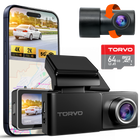
The TORVO TD3 Dash Cam supports memory cards up to 256GB and comes with a 64GB SD Card, according to the product specifications. The camera also records in 4K and includes built-in Wi-Fi and GPS.
The TD3 states that the camera supports 16GB to 256GB cards and advises using a high-speed card for 4K recording. It identifies U1 as a minimum and recommends U3 when additional write-speed performance is needed.
For a TD3 owner, the practical takeaway is simple:
- Stay within the camera’s supported capacity.
- Choose a reputable card.
- Use a card appropriate for continuous video recording.
- Consider high-endurance storage for regular recording.
- Format the card using the camera’s recommended procedure.
If you are purchasing a new card for the TD3, do not assume that the biggest available card is automatically the best choice. Compatibility and recording performance come first.

Should You Buy a 256GB Card?
If your camera supports 256GB, it can be a useful option, but you should consider how you actually drive.
A larger card can be beneficial when you:
- Drive long distances
- Record in 4K
- Use front and rear cameras
- Use parking monitoring
- Want a longer recording history
- Do not regularly transfer footage
But there is a tradeoff.
If you never need more than a few hours of recent footage and regularly copy important clips to your phone or computer, a smaller card may be perfectly adequate.
The goal is not to buy the biggest card. The goal is to buy enough reliable storage for your recording setup.
How Long Does a Dash Cam Memory Card Last?
There are two different questions here.
One is:
How long can the card store footage before it is overwritten?
The other is:
How many months or years can the physical memory card continue working reliably?
They are not the same thing.
The first depends largely on capacity and video data rate.
The second depends on factors such as recording frequency, card quality, operating temperature, and how heavily the card is rewritten.
Dash cam manufacturers recognize that continuous recording can eventually wear out memory cards. Garmin recommends periodic replacement and notes that larger cards may last longer in some use cases because they are overwritten less frequently.
There is no universal replacement interval that applies to every dash cam and every card.
If the camera begins reporting memory errors, recordings become corrupted, or the card behaves inconsistently, replace it rather than continuing to rely on it for important footage.

Should You Format a Dash Cam SD Card?
Yes, when the manufacturer recommends it.
Formatting removes the existing files and prepares the card for use by the camera.
It is particularly useful after installing a new card or when troubleshooting storage-related errors.
The TORVO TD3 documentation includes a format option that formats the files stored on the memory card and recommends regular formatting for stable operation.
Garmin similarly recommends backing up saved footage and formatting compatible cards periodically.
Before formatting, remember to save any clips you want to keep. Formatting is not a substitute for backing up important footage.
What Happens When a Dash Cam Memory Card Is Full?
Most dash cams designed for continuous recording use loop recording.
When the card becomes full, the camera can overwrite older, unlocked video files with newer recordings.
This is one reason a dash cam does not necessarily need enormous storage.
However, important files may be treated differently. Depending on the camera, files associated with an impact or manually locked recordings may be protected from automatic deletion.
Do not assume every camera protects files in exactly the same way.
If an incident occurs, save the relevant clip as soon as practical.
That is especially important if you need the recording for insurance, a police report, or another formal purpose.
How to Choose the Right Dash Cam Memory Card
If you are standing in front of several memory card options and do not know which one to buy, use this checklist.
-
Check the camera’s maximum capacity
A 256GB card is not useful if your camera only supports 64GB. -
Check the required speed class
If the manufacturer specifies Class 10, U1, U3, V30, or another rating, follow that requirement. -
Consider high endurance
For continuous dash cam recording, a high-endurance card is often a sensible choice. -
Consider your recording resolution
4K and multi-camera systems can generate substantially more data than basic 1080p recording. -
Think about how often you drive
A daily commuter and someone who drives several hours every day may have very different storage requirements. -
Buy from a reputable source
Counterfeit or unreliable memory cards can create serious problems when you need a recording. -
Format the card correctly
Use the camera’s recommended formatting procedure before relying on the card.
Quick Memory Card Buying Guide
| Your situation | Capacity to consider | What else to look for |
|---|---|---|
| Short daily commutes | 32GB to 64GB | Check camera compatibility |
| Regular everyday driving | 64GB to 128GB | Class and endurance |
| Long commutes or road trips | 128GB | High endurance is useful |
| 4K or multi-camera recording | 128GB to 256GB | Confirm maximum capacity and write requirements |
| Frequent parking monitoring | 128GB to 256GB | High-endurance card |
| Unknown compatibility | Check manufacturer first | Do not buy based on capacity alone |
These are starting points rather than universal requirements. Always prioritize the camera manufacturer’s specifications.
Frequently Asked Questions
Do all dash cams need an SD card?
No. Many dash cams use removable microSD cards, but storage designs vary by model. Check the manufacturer’s specifications before buying a card.
What size SD card is best for a dash cam?
There is no single best size. 64GB, 128GB, and 256GB can all be appropriate depending on the camera and your recording habits. The maximum capacity supported by the camera should always be checked first.
Is a 32GB SD card enough for a dash cam?
It can be enough for some cameras and shorter recording needs. However, high-resolution or multi-camera systems may benefit from more storage.
Is a 64GB card enough for a dash cam?
A 64GB card can be a practical choice for everyday driving when the dash cam supports that capacity. Actual recording time depends on resolution, bitrate, compression, and the number of cameras recording.
Is a 128GB SD card good for a dash cam?
It can be a good choice for drivers who want a longer recording window, particularly if they drive frequently or use higher-resolution video. Confirm that the dash cam supports 128GB.
Can I use a 256GB SD card in a dash cam?
Only if the dash cam supports 256GB. Capacity limits vary considerably between models. Some cameras support only 32GB or 64GB, while others support 256GB or more.
What type of SD card should I use for a dash cam?
Use a card that meets the camera manufacturer’s capacity and speed requirements. For cameras that record continuously, a high-endurance microSD card is worth considering.
Are dash cam memory cards different from regular SD cards?
They can be. Dash cams repeatedly write and overwrite video, so cards designed for high-endurance continuous recording can be better suited to this workload than cards intended primarily for occasional storage.
How often should I replace my dash cam memory card?
There is no universal replacement schedule. Continuous recording causes memory cards to wear over time. Monitor the card for errors, corrupted footage, or recording problems and follow the camera manufacturer’s recommendations. Garmin, for example, advises periodic replacement because dash cams continuously write to the card.
Should I format my dash cam SD card?
Follow the camera manufacturer’s recommendations. Formatting can help prepare a new card and resolve some storage issues, but always back up important footage first.
Final Thoughts
Choosing a dash camera with memory card storage is not simply about finding the largest card available.
The right choice comes down to compatibility, capacity, speed, endurance, and how you use your vehicle.
For occasional driving, a smaller compatible card may be enough. For daily driving, 64GB or 128GB can provide a larger recording window. For compatible 4K or multi-camera systems, 256GB may be useful when you want more storage before older footage is overwritten.
Most importantly, check the dash cam’s specifications before purchasing the card.
For the TORVO TD3, the official product page lists support for memory cards up to 256GB, making it possible to choose a capacity based on your own driving and recording needs.
If you are looking for a dash cam that combines 4K recording, GPS, Wi-Fi, and support for large-capacity memory cards, you can learn more about the TORVO TD3 Dash Cam.
For more practical guidance on choosing and using a dash cam, explore the TORVO Tips and Fix blog.
Comments (0)
Leave a reply