

Best Budget Dash Cams: What You Give Up and What You Keep
Buying a dash cam does not have to mean spending hundreds of dollars. Many affordable models can record your daily drives, document unexpected incidents, and provide useful footage when you need to review what happened on the road.
The challenge is knowing where manufacturers cut costs. A low-priced camera might offer decent daytime video but struggle with nighttime detail. Another may advertise high-resolution recording while lacking GPS, convenient video transfer, or reliable parking monitoring. Two cameras with similar specifications on their product pages can deliver noticeably different results in real driving conditions.
The best budget dash cam is not necessarily the cheapest model available. It is the one that delivers dependable recording and the features you genuinely need without charging extra for functions you will rarely use.
Here is what to look for, what you can safely skip, and how to make a more informed buying decision.
What Makes a Budget Dash Cam Worth Buying?
An affordable dash cam should handle its primary job well: recording the road so you can review important moments later.
Think about a sudden lane change, a minor collision at an intersection, or a vehicle damaging your car in a parking lot. Clear, accessible footage can help you understand the sequence of events and may be useful when discussing an incident with an insurer or other parties.
A camera does not need every premium feature to be useful. However, a low purchase price means little if the footage is unreadable, recordings disappear unexpectedly, or the camera stops working when you need it.
When comparing an affordable dash cam, prioritize these essentials:
- Usable video quality: Footage should capture meaningful details in the lighting conditions you encounter most often.
- Reliable recording: The camera should record automatically and protect important clips when supported by its features.
- Adequate storage: A compatible memory card should provide enough space for your typical driving routine.
- Practical installation: Mounting the camera securely and routing its cables should be manageable.
- Clear feature information: Recording resolution, storage limits, power requirements, and warranty coverage should be easy to verify.
Once these basics are covered, you can decide whether additional features justify spending more.
What You Give Up With a Cheap Dash Cam
A lower price does not automatically mean poor performance. Still, there are several compromises worth understanding before you buy.
Video quality can suffer, especially at night
Resolution is one of the first specifications shoppers notice. Budget cameras commonly advertise Full HD 1080p, 2K, or 4K recording, but resolution tells only part of the story.
Higher resolution can preserve more detail, making it easier to inspect road signs, vehicle features, and other visual information. However, the image sensor, lens quality, exposure settings, and lighting conditions also affect the final recording.
A cheap 4K camera with weak low-light performance may produce less useful nighttime footage than its headline specification suggests.
Night driving creates additional challenges. Headlights can cause glare, street lighting varies, and moving vehicles may appear blurred. Even a high-resolution recording cannot guarantee that a distant or fast-moving license plate will be readable.
According to Consumer Reports' dash cam buying guide, resolution, frame rate, and storage requirements should all factor into your decision.
What to do: Look for actual daytime and nighttime sample footage. Pay particular attention to moving vehicles, oncoming headlights, and poorly lit streets rather than relying entirely on promotional images.
Fewer advanced features
An entry-level camera may provide basic loop recording without offering built-in GPS, Wi-Fi, a rear camera, or advanced parking surveillance.
That is not necessarily a problem. If you primarily want to document your daily commute, a straightforward front-facing camera may cover your needs.
The trade-off becomes more significant when your driving routine calls for additional protection. For example, rideshare drivers may want cabin recording, while drivers who regularly park on busy streets may value parking monitoring.
What to do: Separate essential features from convenient extras before comparing prices. Paying for features you will never use is no better than buying a camera that lacks something important.
More manual work when accessing footage
Some affordable cameras rely on removing the memory card and opening the recordings on a computer. Others include Wi-Fi and a companion app that lets you view or download clips on your phone.
Without convenient wireless access, retrieving footage after an incident may take longer. However, app-based access can also vary in usability, transfer speed, and compatibility.
What to do: If you expect to review recordings frequently, check whether the camera supports phone connectivity and whether the app works with your device.
Limited parking protection
A dash cam that records while driving may not automatically monitor your vehicle after you turn off the engine.
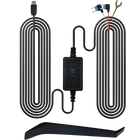
Parking mode can allow compatible cameras to record when motion or an impact is detected, but its operation depends on the model, power supply, and configuration. Some systems require a separately purchased hardwire kit.
Do not assume that a product advertised with parking monitoring can operate continuously with only its standard power cable.
What to do: Confirm the parking mode's requirements, whether the necessary accessories are included, and how the system protects your vehicle's battery from excessive discharge.
What You Should Keep When Buying an Affordable Dash Cam
The smartest way to save money is to reduce unnecessary extras, not compromise on the fundamentals of recording.
Reliable video recording
For many drivers, a good Full HD camera is a reasonable starting point. A 2K or 4K model may be worth the additional cost if capturing finer details is a priority.
Remember that recording resolution and frame rate work together. Higher frame rates can improve the smoothness of moving footage, while higher resolutions preserve more image detail. The best combination depends on the camera's capabilities and your driving conditions.
Before buying, check whether the advertised resolution applies to the front camera, the rear camera, or both.
Loop recording and protected clips
Loop recording allows a dash cam to overwrite older footage when the memory card fills up. This makes continuous recording practical without requiring you to manage every video manually.
Many cameras also offer event recording that protects certain clips after a detected impact. The exact behavior varies by model, so check how event files are stored and whether they can be overwritten.
These functions are often more valuable in everyday use than decorative screens or unnecessary interface features.
Enough storage for your routine
Affordable cameras may have different memory card requirements and storage limits. Higher-resolution footage also consumes more space, and recording from multiple cameras increases storage demands.
Look for a model with a clearly stated maximum supported capacity and use a compatible card recommended by the manufacturer. A high-endurance microSD card designed for repeated video recording is worth considering.
The included memory card matters, too. A camera advertised at an attractive price may require an additional purchase before you can use it.
Practical mounting and easy operation
A dash cam should sit securely without obstructing your view of the road. Its controls should be straightforward enough that you do not need to spend time navigating complicated menus while driving.
A compact design, a dependable mount, and clear instructions can make a meaningful difference to everyday usability.
If you plan to install a rear camera, consider the additional cable routing involved. A dual-camera setup can offer broader coverage, but installation is usually more involved than mounting a front-facing unit alone.
Budget Dash Cam Features Compared
Use this table to distinguish between features worth prioritizing and those you can choose according to your needs.
| Feature | Priority | Why it matters |
|---|---|---|
| Clear video recording | Essential | Helps preserve useful visual evidence |
| Loop recording | Essential | Supports continuous recording |
| Compatible memory card | Essential | Provides space for saved footage |
| Night recording performance | High | Helps capture details after dark |
| GPS | Situational | Can record location and speed data when supported |
| Wi-Fi and mobile app | Convenient | Makes reviewing and transferring clips easier |
| Rear camera | Situational | Records traffic and incidents behind the vehicle |
| Parking monitoring | Situational | Can help document certain parked-vehicle incidents |
| Cabin camera | Situational | Useful for some rideshare and commercial drivers |
| Cloud connectivity | Optional | May provide remote access on supported systems, sometimes with a subscription |
The best combination depends on how you use your vehicle. A commuter who parks in a private garage may have different priorities from someone who leaves a car on public streets overnight.
Is 1080p Enough, or Should You Choose 2K or 4K?
This is one of the most common decisions when shopping for the best cheap dash cam.
| Resolution | Best suited for | Main consideration |
|---|---|---|
| 1080p Full HD | Basic daily recording | Often more affordable and less demanding on storage |
| 2K | Drivers seeking additional image detail | A useful middle ground, depending on image quality |
| 4K Ultra HD | Drivers prioritizing finer recorded detail | Larger files and potentially higher equipment costs |
These categories are general guidelines, not guarantees of image quality.
A well-designed camera with a good sensor and suitable exposure settings can outperform a poorly implemented camera with a higher advertised resolution. Nighttime performance is particularly difficult to judge from specifications alone.
If you regularly drive on highways, inspect unfamiliar roads, or want more detail to review after an incident, consider investing in a higher-resolution model if the overall image quality supports it.
For drivers who mainly want a record of routine trips, a capable 1080p or 2K camera may be sufficient.
Front-Only or Front and Rear: Which Is Better on a Budget?
A front-facing camera records what happens ahead of your vehicle. A dual-camera system adds coverage behind the car, which can be valuable when another driver rear-ends you or an incident develops outside the front camera's field of view.
The right choice depends on your priorities.
Choose a front-only camera if:
- You want the simplest and most affordable installation.
- Your main concern is documenting events ahead of you.
- You have limited space in your budget.
Consider front and rear recording if:
- You frequently drive in heavy traffic.
- You want footage from both ends of the vehicle.
- You are willing to pay more and manage the additional installation.
Keep in mind that a wide-angle front camera cannot replace a dedicated rear camera. It may capture some surrounding activity, but it will not necessarily provide the same detail or perspective behind your vehicle.
If rear coverage is important, compare complete dual-camera systems rather than looking at front-camera resolution alone.
Are Budget Dash Cams Good Enough for Night Driving?
They can be, but this is an area where careful comparison matters.
Nighttime recording is affected by sensor sensitivity, lens aperture, exposure, glare control, and the amount of available light. Advertised terms such as "night vision" do not necessarily mean that a camera will capture readable plates in complete darkness.
When evaluating a low-cost model, look for sample clips recorded on actual roads at night. Check whether traffic signs remain visible, whether headlights overwhelm the image, and whether moving vehicles retain useful detail.
It is also worth checking the camera's mounting position. A lens pointed through a dirty windshield or positioned behind a heavily tinted section can produce poor results regardless of its specifications.
Avoid assuming that a camera will deliver perfect footage in every situation. Even premium systems have limitations in darkness, rain, fog, and fast-moving traffic.
When Is It Worth Spending More on a Dash Cam?
Sometimes the cheapest option is all you need. In other cases, spending more can provide features that better match your driving habits.
Consider these examples:
- Daily city driving: Prioritize reliable recording, usable nighttime footage, and easy access to saved clips.
- Highway commuting: Consider higher-resolution recording and a camera with good image detail at speed.
- Overnight street parking: Look for compatible parking monitoring and understand its power requirements.
- Rideshare driving: Consider whether you need both rear-road and cabin coverage.
- Frequent road trips: GPS, wireless access, and sufficient storage may make reviewing recordings easier.
You should also consider the total cost of ownership. A camera's purchase price may not include a suitable memory card, a parking-mode hardwire kit, or other necessary accessories.
A slightly more expensive package that includes the equipment you need may offer better value than a cheaper camera that requires several additional purchases.
An Affordable 4K Option to Consider: TORVO TD3
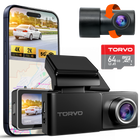
If you want more than basic front-facing recording without moving immediately into a premium price category, the TORVO TD3 4K Dashcam is worth comparing against your requirements.
According to the product page, the TD3 offers 4K front and 2K rear recording, a 64GB memory card, support for cards up to 256GB, built-in GPS and Wi-Fi, a 3.2-inch IPS display, and a 170-degree viewing angle.
It also lists 24-hour parking monitoring. Before relying on that feature, check the product documentation for the required power setup and any additional accessories.
Here is how its listed features relate to the buying criteria discussed above:
| TORVO TD3 feature | Potential benefit |
|---|---|
| 4K front and 2K rear recording | Records the road ahead and behind at different resolutions |
| Included 64GB memory card | Provides storage to get started |
| Support for up to 256GB | Offers the option of expanding storage |
| Built-in GPS | Supports location and speed data recording |
| Built-in Wi-Fi | Provides wireless connectivity for supported functions |
| 3.2-inch IPS display | Makes on-device viewing and menu navigation more convenient |
| 170-degree viewing angle | Captures a broad view of the road |
| Listed parking monitoring | Offers a feature to investigate for parked-vehicle recording needs |
These specifications make the TD3 a candidate for drivers comparing feature-rich, affordable dash cams. As with any model, actual image quality, installation requirements, and the operation of individual features should be assessed against your needs.
Review the TORVO TD3 4K Dashcam product details before purchasing to confirm current pricing, included accessories, and compatibility with your vehicle.
For more car technology tips and practical buying advice, you can also explore the TORVO Tips and Fix blog.
How to Choose the Best Cheap Dash Cam Without Regretting It
Before you buy, run through a short checklist:
- Check real footage: Look for daytime and nighttime recordings rather than relying only on sample photographs.
- Confirm the resolution: Make sure the listed specifications describe the cameras you intend to use.
- Check storage requirements: Verify the supported memory card type and maximum capacity.
- Understand the power setup: Find out whether parking monitoring requires additional hardware.
- Compare included accessories: Account for memory cards, cables, mounts, and other necessary equipment.
- Read the warranty terms: Confirm the coverage period and what the manufacturer includes.
- Review the installation process: Make sure the system suits your vehicle and your willingness to route cables.
It is also sensible to check local rules concerning windshield-mounted devices, recording audio, and filming other people. Requirements vary by jurisdiction, so do not assume the same rules apply everywhere.
Once installed, verify that the camera records correctly, the date and time are accurate, and older footage is handled as expected. Test the system before relying on it to document an important journey.
Frequently Asked Questions About Budget Dash Cams
What is the best budget dash cam?
The best option is one that combines reliable recording, suitable image quality, adequate storage, and the features you need at a price you can justify. Compare actual footage and operating requirements instead of choosing solely by advertised resolution.
Are cheap dash cams worth buying?
Yes, an affordable dash cam can be worthwhile if it records consistently and produces usable footage. The main risk is buying a model that sacrifices image quality, reliability, or essential features to achieve a lower price.
Is a 1080p dash cam good enough?
A 1080p camera can be sufficient for everyday recording. However, finer details may be harder to identify at a distance, especially at night or when vehicles are moving quickly. A good 2K or 4K model may preserve more detail, depending on its sensor and lens quality.
Do budget dash cams record at night?
Many do, but their performance varies. Look for real nighttime sample footage that shows how the camera handles headlights, dark roads, and moving vehicles. A high resolution alone does not guarantee clear night recordings.
Do cheap dash cams have parking mode?
Some do. However, parking monitoring may require a hardwire kit or another compatible power arrangement. Check whether the feature is supported, how it operates, and whether additional equipment is needed.
Should I buy a dash cam with GPS?
GPS is useful if you want supported recordings to include location and speed information. If you only need video footage of the road, you may be comfortable without it. Check how the model records and displays GPS data before making your decision.
Is a front and rear dash cam worth the extra cost?
It can be, especially if you want to document incidents involving vehicles behind you. A dual-camera system provides broader coverage than a front-only model, although it usually involves more installation work and additional storage requirements.
How much should I spend on a budget dash cam?
There is no single price that suits every driver. Start by identifying the features you need, then compare the complete cost of the camera, memory card, mounting hardware, and any parking-mode accessories. Focus on overall value rather than the lowest advertised price.
Final Thoughts
Choosing a budget dash cam is about finding the right balance between price, recording quality, and everyday usability.
You can often save money by skipping features you do not need. What you should not overlook is consistent recording, usable nighttime footage, adequate storage, and a setup that works reliably in your vehicle.
Compare real-world footage, understand the limitations of advertised specifications, and account for any additional accessories before making your decision. If you want higher-resolution front recording, rear coverage, GPS, and Wi-Fi in one system, the TORVO TD3 is one option to evaluate against your requirements.
The goal is simple: buy a camera that fits your budget while still doing the job you bought it for.
Comments (0)
Leave a reply